Biodiversity Heritage Library - Program news and collection highlights from BHL
  • Home
  • News
  • Featured Books
    • All Featured Books
    • Book of the Month Series
    • BHL at 20
  • User Stories
  • Campaigns
    • Fossil Stories
    • Garden Stories
    • Monsters Are Real
    • Page Frights
    • Her Natural History
    • Earth Optimism 2020
  • Tech Blog
  • Visit BHL
Home
News
Featured Books
    All Featured Books
    Book of the Month Series
    BHL at 20
User Stories
Campaigns
    Fossil Stories
    Garden Stories
    Monsters Are Real
    Page Frights
    Her Natural History
    Earth Optimism 2020
Tech Blog
Visit BHL
  • Home
  • News
  • Featured Books
    • All Featured Books
    • Book of the Month Series
    • BHL at 20
  • User Stories
  • Campaigns
    • Fossil Stories
    • Garden Stories
    • Monsters Are Real
    • Page Frights
    • Her Natural History
    • Earth Optimism 2020
  • Tech Blog
  • Visit BHL
Biodiversity Heritage Library - Program news and collection highlights from BHL
BHL News, Blog Reel, Tech Updates

Updates to API & Tech Documents

Portrait version of the Biodiversity Heritage Library logo.

New updates have been released for the BHL API, plus new documentation about data exports and other services are now available on the Developer Tools and API section of the BHL wiki.

The BHL Application Programming Interface (API) is a set of web services that can be invoked via HTTP queries (GET/POST requests) or SOAP. Responses can be received in one of three formats: JSON, XML, or XML wrapped in a SOAP envelope.

Version 1 (formerly the BHL Name Services): Updated documentation for the first version of the API can be found at http://www.biodiversitylibrary.org/api/docs/docs.html. This version of the API is provided solely to maintain backwards compatibility.

Version 2: The documentation for the latest version of the API can be found at http://www.biodiversitylibrary.org/api2/docs/docs.html. The first version of the API was limited to data related to scientific names found in the BHL collection; version 2 adds access to title, author, volume, and page information. Please note that users are required to obtain an API Key from http://www.biodiversitylibrary.org/getapikey.aspx in order to use version 2 of the API. This is the preferred version of the API.

View the API Privacy Policy and Terms Of Use.

April 15, 2010by [email protected]
BHL News, Blog Reel

Update on BHL-Europe and job posting for Team Leader and ICT specialist

Portrait version of the Biodiversity Heritage Library logo.

The lack of access to the published biodiversity literature is a major obstacle to efficient research and a broad range of other applications, including education, biodiversity conservation, protected area management, disease control, and maintenance of diverse ecosystems services. This literature also has cultural importance as a resource for the study of the history of science, art and other non-science applications. Currently, a large number of small projects are digitising biodiversity material in numerous institutions across the EU to make access more open, but the corpus will still be seriously fragmented. These projects do not use common standards or interfaces and are not interoperable. In alignment with the EC i2010 initiative, the project “Biodiversity Heritage Library for Europe” (BHL-Europe) aims to make the biodiversity knowledge available to everybody who is interested by improving the interoperability of European biodiversity digital libraries.

BHL-Europe will review and test different approaches for such libraries based on the experiences of the partners involved in the project. The consortium will establish a best practice approach and promote the adoption of standards and specifications for the large-scale implementation in a real-life context. BHL-Europe will provide a multilingual access point for search and retrieval of digital content through EUROPEANA. In addition, it will provide a robust multilingual portal with sophisticated search tools to facilitate the search for taxon-specific biodiversity information. The project will also develop operational strategies and processes for long-term preservation and sustainability of the data produced by national biodiversity digitisation programmes. BHL-Europe will generate activities to raise awareness and to ensure that the project outputs are known and used by the target users and that the proposed approach directly addresses user needs. BHL-Europe experience and best practice will be shared with the wider digital library community.

The Museum für Naturkunde Berlin is leading this three year project carried out within the eContentplus programme of the European Commission and is looking for a

Team Leader and ICT specialist
code number 05/09

– Salary group BAT-O IIA / Ib

– From 1st of May 2009

– Subject to the final approval of project funding

– Position limited for 3 years

– Full-time position

Tasks: Lead the work package “Analysis of domain content and management of the content acquisition process” of BHL-Europe; Develop, enhance and maintain bibliographic informatics and metadata exposure tools; Support and coordinate the development and implementation of integrative work-flows, tools and interfaces for the ingestion and presentation of digitised content; Coordinate with the other work packages, related networks, and scanning centres; Fundraising activities to set up scanning projects.

Qualifications: Completed Diploma/Master in informatics or qualifications in related subjects; Experience with open source programming languages (e.g. PHP, Perl), database programming (e.g. MySQL), markup languages (e.g. HTML, XML), Web site development, OAI interface development, and development of tools based on Web 2.0 technologies; Experience with library specific skills (e.g. management of metadata, work with OPAC); Project management skills (incl. MS Project); Background in life sciences desired; Fluent in English and German; Excellent inter-personal and communication skills; Experience with fundraising.

Museum für Naturkunde is an equal opportunity employer, committed to the advancement of individuals without regard to ethnicity, religion, sex, age, disability or any other protected Status.

For further information please contact Dr. Henning Scholz, [email protected] ++49-30-2093-8864

Further information of the Leibniz-Gemeinschaft: www.leibniz-gemeinschaft.de

Applications are accepted in English and German and should be sent under code number 05/09 within 2 weeks (April 2, 2009) to:

Museum für Naturkunde
Leibniz-Institut für Evolutions- und Biodiversitätsforschung an der Humboldt-Universität zu Berlin Invalidenstraße 43
10115 Berlin

http://www.leibniz-gemeinschaft.de

March 24, 2009by [email protected]
BHL News, Blog Reel, Tech Updates

Updates to BHL exports now include LCSH and all pages

Portrait version of the Biodiversity Heritage Library logo.

Following user requests, the BHL exports now include Library of Congress Subject Headings (LCSH) and metadata for all pages in the BHL collection.

The updated documentation, including URLs to files and database schema, is available at:
http://www.biodiversitylibrary.org/data/BHLExportSchema.pdf

For a more lengthy description of motivation for these exports and plans for future services, please read Export of titles & scientific names in BHL now available for download.

March 13, 2009by [email protected]
BHL News, Blog Reel, Tech Updates

Now serving all page images via djatoka

Portrait version of the Biodiversity Heritage Library logo.

Last fall developers Ryan Chute and Herbert Van de Sompel from Los Alamos National Laboratory’s Research Library released djatoka, a new Open Source JPEG 2000 image server. This new project, first reported in D-Lib Magazine, provides a scalable and open solution for delivering high resolution JPEG 20000 images, such as the (nearly) 11 million pages scanned to date and made available through the Biodiversity Heritage Library.

This development was greeted with cheers by the BHL Technical Development Team, as it solves problems we’ve previously reported with the non-scalable, proprietary solutions used to serve JPEG 2000 images. Following a functional evaluation in December 2008, djatoka was integrated into the BHL staging site for performance testing and was promoted to production on Thursday, January 22, 2009.

To view djatoka in use on BHL materials, check out the following page from “Wild oxen, sheep & goats of all lands, living and extinct” by R. Lydekker published in 1898, selected in honor of the Chinese New Year, in this, the Year of the Ox:
http://www.biodiversitylibrary.org/page/9370105
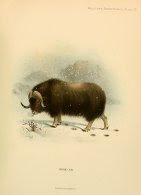
View Full Size Image

JPEG 2000: An excellent format with poor support
Displaying JPEG 2000 images on the web can be a challenge because 1) the images are often too large to be downloaded quickly, 2) most web browsers don’t understand JPEG 2000 images without appropriate plug-ins, and 3) until the release of djatoka there were no active open source image servers; costly commercial solutions were the only option, aside from complete custom development.

JPEG 2000 images are different from traditional image formats like GIF, JPEG, and PNG in that they consist of several “layers”, one for each available resolution. Think of JPEG 2000 images as a pyramid – each layer of a JPEG 2000 file is a copy of the same image, each at progressively larger size as you step down the pyramid. The top layer may be relatively small but the bottom layer could be quite large. Consider a JPEG 2000 image whose bottom layer is 18,000 pixels square, such as this example. To view this image in its entirety using standard 1024 x 1280 monitors would require an array of 270 monitors stacked 15 high and running 18 wide! Cool, yes, but impractical.

So, to deliver JPEG 2000 images to web users, scalable software is needed to carve up the JPEG 2000 image into smaller chunks at a given resolution in a format natively understood by a users’ browser. And, since we are talking about this occurring during the load time of a web page, all of this has to happen very quickly.

BHL’s first approach to JPEG 2000 delivery
BHL has delivered JPEG 2000 images to users since its public launch in February 2007 using a mix of proprietary and open source technologies. BHL development activities are organized at Missouri Botanical Garden (MOBOT), whose Botanicus digital library system was an early prototype for BHL. Guided by previous work by MOBOT developers, and reusing the infrastructure already in place at MOBOT, BHL developers integrated LizardTech’s ExpressServer for server-side JPEG 2000 tiling and the open source GSIV javascript library for interface display.

Though functional, the addition of BHL’s 1,500 users per day pushed ExpressServer beyond its available capacity, causing a significant delay in delivering page images. Since it is a commercial solution, and one that is licensed by processor, to increase capacity would require the purchase of an additional ExpressServer license, costing upwards of $15,000USD. An open source option was needed, but none was available until the release of djatoka.

About djatoka
djatoka (pronounced jay-too-kay) uses the Kakadu library to process and present JPEG 2000 images. It is a Java-based web application that runs on Apache Tomcat. djatoka allows a web page to perform an asynchronous request to get image parameters, such as maximum size of the image or the number of resolution levels available. The web page can then execute some javascript to request the necessary image tiles from djatoka and arrange them within the browser to form a larger composite image, similar to the now ubiquitous Google Maps interface.

djatoka provides a streamlined API for developers to script against to generate and assemble the image tiles. Further, the existing IIPImage Javascript Viewer has been modified to work with djatoka, relieving potential adopters of the significant burden of writing complex code to calculate, request, and assemble necessary tiles. IIP also provides interface functionality that enables the user to pan around the image and zoom in or out.

For detailed information about djatoka, including source code for download, visit:

  • djatoka info – http://african.lanl.gov/aDORe/projects/djatoka
  • djatoka on SourceForge: http://sourceforge.net/projects/djatoka

djatoka in BHL
djatoka offers a rich user interface through integration of the IIPImage JavascriptViewer.BHL already had an existing interface for delivering images that tested well with users, so our goal was to use djatoka as a drop-in replacement for ExpressServer without affecting end user functionality. With those objectives in mind, we made the following changes to IIPImage and left the server alone; it’s running pretty much in its default state save for some caching options we customized.

djatoka brought with it some improvements to our user interface:

  • Preview thumbnail. This allows a user to see which portion of the overall image is being viewed. This also lets the user easily view different parts of the image by simply dragging the control to the desired part of the image.
  • Simplified zoom controls. With our djatoka implementation we got rid of the radio buttons formerly used to zoom in and out and replaced them with plus and minus buttons.

Some changes we made to the djatoka viewer are as follows:

  • We needed to retain the Save and Print image features from the previous image viewer. Therefore, we rolled these into the djatoka viewer.
  • BHL defaults to serving a single low resolution JPEG images, when available, and only escalates to more costly JPEG 2000 processing when instructed by the user. We made the djatoka viewer friendlier toward raw JPEGs. djatoka itself handles raw JPEGs with aplomb.
  • We removed a text box that provides a way to embed a Region Of Interest (ROI), or “slice,” of the image as tiled by djatoka. While this is a very useful feature, we felt the current implementation consumed too much screen space of the visible page image. We plan to reintroduce this in a less obtrusive manner.

In the end, we were successful in creating a drop-in replacement for the existing viewer. We didn’t drastically change our user interface but still managed to make significant improvements. We chose an evolution this time around; the revolution has been carefully scheduled for another date.

Towards a scalable infrastructure
BHL developer Phil Cryer has written an excellent and detailed blog post about the technical infrastructure devised to provide scalability and fault tolerance to our djatoka implementation. It is available at http://www.fak3r.com/2009/01/27/howto-serve-jpeg2000-images-with-a-scalable-infrastructure/.

Future work
While we are happy with our initial implementation of djatoka, we have already planned some future enhancements and have begun discussions concerning priorities with the djatoka development community, including lead developers Chute and Van de Sompel. These enhancements are as follows:

  • An embed image link. This will directly replace functionality we removed from our implementation of the djatoka viewer. Drawing from similar features elsewhere, we are leaning toward a clickable link icon which pops up a box which contains a URI for the image as the user is currently viewing it.
  • The current djatoka viewer is based on an old version of MooTools. Newer versions of MooTools are not compatible with the djatoka viewer. We’d like to fix this so that it’s easier to drop into a website that uses a current or future version of MooTools. This will allow us to use a newer and more flexible version of this useful code library, and will allow others to reuse our work more easily.

Currently, our changes to the djatoka viewer are pretty specific to the BHL. In the spirit of Open Source, we will make these enhancements available to the community. We have the goal of making the viewer generic enough so that it can be used without major customizations, and we will be considering several use cases for our work.

Conclusion
As described above, djatoka has easily integrated into the production BHL infrastructure and user interface with minimal effort. It has nullified problems that existed with the previous, proprietary solution used to deliver JPEG 2000 images, and thus far has performed without significant error or delay since being promoted into production at www.biodiversitylibrary.org. Because this is an open source solution, BHL can easily scale up without significant expense should we require additional capacity. Our experience implementing djatoka has been overwhelmingly positive, and we would encourage any project currently serving JPEG 2000 images to evaluate its features and functionality within your infrastructure.

If you’d like to learn more about djatoka visit the main web site or get the code from SourceForge. Join the listservs to become an active member of the djatoka development community, as the lists are the best source of current information and have an active user base. Finally, please leave comments or feedback about our specific implementation of djatoka in BHL using the Comment form below.

Chris Freeland, BHL Technical Director
chris.freeland (at) mobot.org

Chris Moyers, BHL Developer
chris.moyers (at) mobot.org

January 26, 2009by [email protected]
BHL News, Blog Reel, Tech Updates

Article download now available!

Portrait version of the Biodiversity Heritage Library logo.

Since the public launch of BHL in Feb 2008, the BHL Technical development team has received repeated requests for an interface that would allow users to download a PDF for an individual article within one of the digitized books in BHL. This is actually a fairly challenging task, as previously reported, but with the right technology and a little bit of luck we’ve devised a solution that is working very well in production and is receiving positive feedback. Here’s how it works.

You come across following reference:

Wormald, H. “Variation in the male hop, Humulus lupulus L.” The Journal of agricultural science. 7:175-197. 1915.

A quick title search for The Journal of agricultural science shows that it is available through BHL at http://www.biodiversitylibrary.org/bibliography/8643, and that volume 7 is online at http://www.biodiversitylibrary.org/item/35866. Scrolling to page 175, you find Wormald’s article.

To download a PDF of this article, hold your mouse over the “Download/About this book” link and click “Select pages to download”. From the resulting page, check the boxes next to pages 175 through 197, then click the “Next” button.

From here we ask you to do a little optional data entry by adding the article’s title and author(s). We don’t require this, but if you take the time to fill out this information we’ll hold onto it and index it so that other users will be able to find the article in future searches. In this way your work will benefit the wider community of BHL users.

After clicking “Submit”, your job will get added to our queue and you’ll get an e-mail notification that we’ve received your request. And then the tech-fun begins! We use an open source application called iText to generate the PDF by passing off URLs to the JPEG2000 image for each page, stored on Internet Archive’s servers. iText converts that series of pages into a single PDF and writes the file out to BHL servers. Depending on server & network load, and the size of each article, this process can take anywhere from a few seconds to several minutes. Once complete, you’ll then receive another e-mail notifying you that your PDF is available for download. For the request above, you would receive the following:

Your PDF generation request has been completed.

The PDF can be downloaded from the following location: http://www.biodiversitylibrary.org/pdf1/000107600035866.pdf.

We include a cover sheet in the PDF that lists value-added information like bibliographic metadata about the title and volume, as well as attribution for the library that contributed the volume and the organization that sponsored its digitization. We also include the OCR text for the article (actually it’s a selection you can make when choosing pages to include; the PDF above has the text included).

This feature is in production now, but it’s still new and needs refinement, so we encourage users to try it out and provide feedback. We’ll continue to improve the functionality based on requests and suggestions from users over time. Please either leave your comments below or submit them to our Feedback form.

January 15, 2009by [email protected]
BHL News, Blog Reel, Tech Updates

COinS integrated to support Zotero, other reference management software

Portrait version of the Biodiversity Heritage Library logo.

We have pushed a change to the BHL Portal user interface to enhance usability of our books. The new page is available at:
http://www.biodiversitylibrary.org/bibliography/4323

Our goal with the improvement was to make the page more visually informative and, at the same time, easier to understand. We also took this opportunity to add in code that makes BHL more readily indexed by Zotero and other reference management applications. We’ve embedded COinS (ContextObject in Span) into the page above, as well as the pageturning view, at:
http://www.biodiversitylibrary.org/item/23172

COinS are snippets of bibliographic metadata embedded in a page using a span tag (hence the name). Reference management software, especially Zotero, use these snippets to automatically populate an entry, so that BHL users can be building reference lists within their citation managers as they’re using our site. Here’s what COinS look like:


&rft.genre=book &rft.btitle=At+last%3a+a+Christmas+in+the+West+Indies.+ &rft.place=London%2c &rft.pub=Macmillan+and+co.%2c &rft.aufirst=Charles &rft.aulast=Kingsley &rft.au=Kingsley%2c+Charles%2c
&rft.pages=1-352 &rft.tpages=352″>

Unfortunately there is a known issue in Zotero using COinS to describe journals themselves, so users get an error when trying to add a page like the following to Zotero:
http://www.biodiversitylibrary.org/bibliography/8188

The workaround invalidates the COinS standard, based on OpenURL, so we decided to err on the side of good metadata and standards compliance and publish the COinS correctly. There are other ways of making Zotero work for journals, which we will implement in the next UI release.

Please comment below with suggestions for improvement or issues concerning these updates.

December 7, 2008by [email protected]
BHL News, Blog Reel, Tech Updates

Revised BHL Data Model

Portrait version of the Biodiversity Heritage Library logo.

The latest revision of the BHL Data Model is now available for review at:
http://www.biodiversitylibrary.org/documents/BHLDataModel_20080805.pdf

August 5, 2008by [email protected]
Page 2 of 4«1234»

Help Support BHL

BHL's existence depends on the financial support of its patrons. Help us keep this free resource alive!

search

About BHL

The Biodiversity Heritage Library (BHL) is the world’s largest open access digital library for biodiversity literature and archives. BHL operates as a worldwide consortium of natural history, botanical, research, and national libraries working together to digitize the natural history literature held in their collections and make it freely available for open access as part of a global “biodiversity community.”

Join Our Mailing List

Sign up to receive the latest news, content highlights, and promotions.

Subscribe Now

Subscribe to Blog via Email

Enter your email address to subscribe to this blog and receive notifications of new posts by email.

Join 319 other subscribers

Subscribe to Blog Via RSS

Subscribe to the blog RSS feed to stay up-to-date on all the latest BHL posts.

Access RSS Feed

Inspiring Discovery through Free Access to Biodiversity Knowledge.

The Biodiversity Heritage Library makes it easier than ever for you to access the information you need to study and explore life on Earth…for free, anytime, anywhere.


ABOUT | HARMFUL CONTENT | PRIVACY | SITE MAP | TERMS OF USE