Biodiversity Heritage Library - Program news and collection highlights from BHL
  • Home
  • News
  • Featured Books
    • All Featured Books
    • Book of the Month Series
    • BHL at 20
  • User Stories
  • Campaigns
    • Fossil Stories
    • Garden Stories
    • Monsters Are Real
    • Page Frights
    • Her Natural History
    • Earth Optimism 2020
  • Tech Blog
  • Visit BHL
Home
News
Featured Books
    All Featured Books
    Book of the Month Series
    BHL at 20
User Stories
Campaigns
    Fossil Stories
    Garden Stories
    Monsters Are Real
    Page Frights
    Her Natural History
    Earth Optimism 2020
Tech Blog
Visit BHL
  • Home
  • News
  • Featured Books
    • All Featured Books
    • Book of the Month Series
    • BHL at 20
  • User Stories
  • Campaigns
    • Fossil Stories
    • Garden Stories
    • Monsters Are Real
    • Page Frights
    • Her Natural History
    • Earth Optimism 2020
  • Tech Blog
  • Visit BHL
Biodiversity Heritage Library - Program news and collection highlights from BHL
BHL News, Blog Reel, Tech Updates

BHL Improves the Speed and Accuracy of its Taxonomic Name Finding Services with gnfinder

New and improved BHL name finding services

BHL has deployed a new taxonomic name finding tool to improve the speed and accuracy of identifying names throughout its 58+ million pages.

BHL is now using Global Names Architecture’s (GNA) gnfinder tool to locate taxonomic names in the BHL corpus. Prior to this deployment, BHL’s name finding services were based on an index of scientific names created by GNA developers six years ago by parsing every page in BHL one by one. This took 45 days to accomplish, and the cost of repeating this process made updating or improving the index infeasible.

The gnfinder tool uses fast, scalable programming languages to significantly reduce computational time. Using Open Source applications in Go and Scala, the tool detects candidate scientific names and compares them to millions of scientific name-strings aggregated by GNA for verification. The new process decreases the time needed for name detection and name verification from 35 days to 5 hours and from 7 days to 12 hours, respectively. As a result, the entire BHL corpus can now be indexed in less than a day, compared to the 45 days needed for the previous index. Additionally, by significantly reducing computational time, implementing iterative improvements to the index is now achievable.

The accuracy of the names identified has also been improved with this deployment. By eliminating questionable results and false positives from the previous index, gnfinder produces a more accurate index of names in BHL. More than 34 million unique names — representing more than 239 million total instances of taxonomic name strings — were identified across the BHL corpus as of 21 July 2020. Of these, approximately 11.7 million are “Verified Names”, meaning they are unique names that have been resolved against a name authority (NameBank, Catalogue of Life, etc).

The gnfinder tool was developed by Dmitry Mozzherin and Alexander Myltsev as part of GNA project work at the University of Illinois at Urbana-Champaign. Mozzherin shared more about the process of developing this tool at the Biodiversity Next conference in Leiden, The Netherlands in 2019. Learn more in the presentation slides.

You can learn more about how the BHL implementation of the gnfinder tool works in our FAQ.

We would like to thank our colleagues at Global Names Architecture — especially Dmitry Mozzherin, Alexander Myltsev, and David Patterson — for their work to develop these tools. Thanks also to Joel Richard (BHL Technical Coordinator and Head of Web Services and IT at Smithsonian Libraries) and Mike Lichtenberg (BHL Lead Developer) for their work to deploy gnfinder on the BHL website.

If you have questions about gnfinder or would like to provide feedback or suggestions, please contact Global Names Architecture via the Global Names BHL project on GitHub.

Global Names development on BHL indexing is supported by National Science Foundation grants #1356347 and #1645959 as well as the Species File Group at the University of Illinois.

July 21, 2020by michelle.underhill
BHL News, Blog Reel, Tech Updates

BHL Participates in the Global Names Workshop

gnames-workshop.jpg

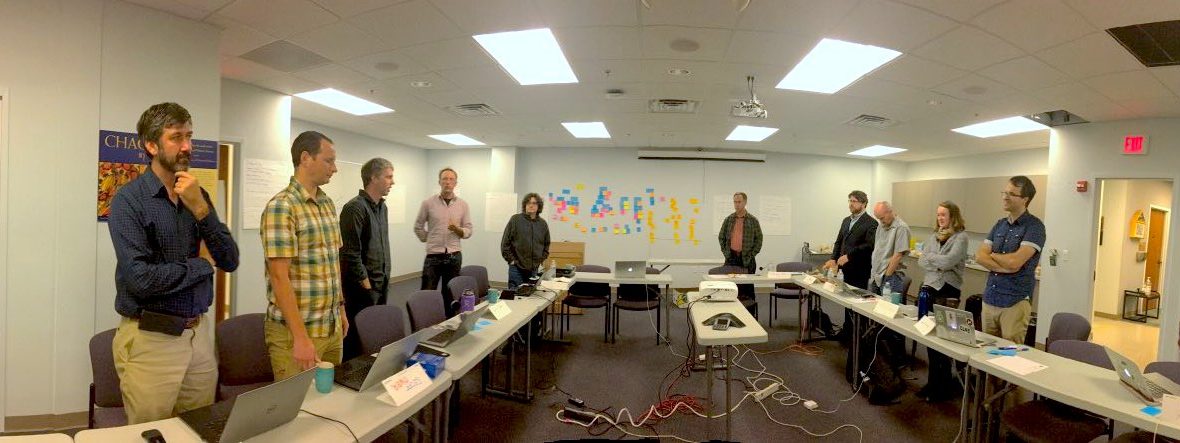
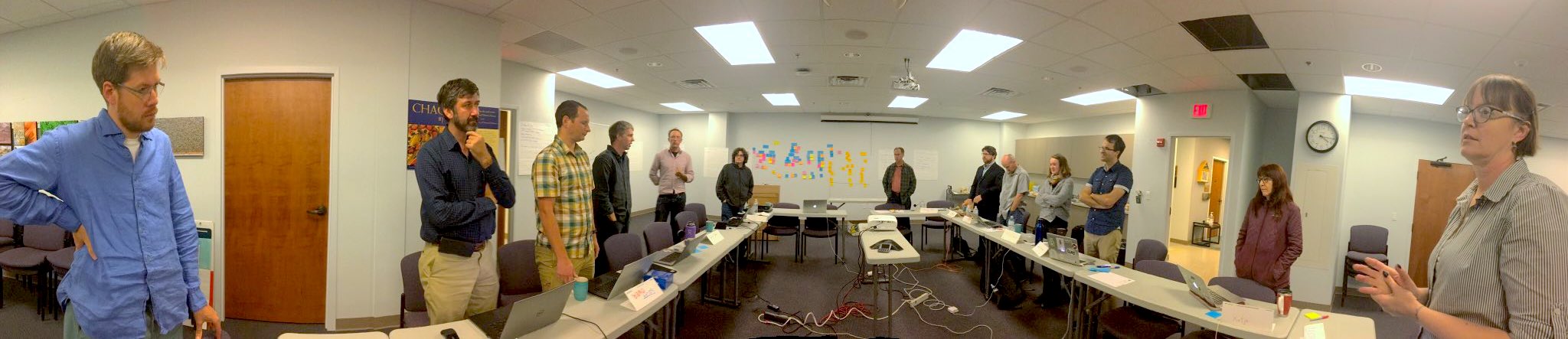
Participants at the The Global Names Project workshop discuss progress in a morning “stand up” briefing. Photo by Deborah Paul (iDigBio).

The Global Names Project held a workshop on 17-19 June 2019 on the Campus of the University of Illinois at Urbana-Champaign. The workshop was titled Scientific names indexing and data mobilization of Biodiversity Heritage Library using tools from Global Names project and was hosted by the Species File Group at the  Illinois Natural History Survey. Eighteen people attended representing a variety of organizations interested in BHL content: Global Names Architecture, iDigBio, TaxonWorks, UIUC Species File Group, the Illinois Library, Encyclopedia of Life, the DINA Project, the Catalogue of Life, GBIF, Species File Group Argentina, the HathiTrust Research Center, and Global Biotic Interactions.

The workshop was organized as an unconference/hackathon in which the meeting is planned by all participants at the workshop. We initially all proposed topics we individually were interested in exploring; these were our “selfish goals”. In an exercise at the workshop, those goals were broken into similar or related topics. The most popular topics (see those sticky notes on the wall — in the background of the photo) became the focus of “pitches”, i.e. challenges that we could address at the workshop. We self-organized into working groups under the banner of pitch and got to work.

Note that at a hackathon, the goal is that you are always either “doing or learning.” For example, some of us learned how to mine BHL content using the Developer and Data Tools. And if you’d like to try it, you too can install and use the gnfinder and gnparser tools. The gnparser tool breaks scientific name-strings into the semantic elements of the string. While gnfinder searches text output (like OCR) for names.

Overall, the activities of the workshop centered around further improving the information that we can extract from the OCR (optical character recognition) content that is generated from the page images in BHL, including improving that OCR content itself.

One group focused on attempting to find Species Identification Keys in BHL. Using a versioned, citable, and verifiable snapshot of the BHL OCR text corpus1, the group discovered that a variety of ways in which a species identification key is labeled in the text combined with the natural inaccuracies of OCR make the task of identifying a heading for a key challenging2.

Another group worked on connecting the APIs of TaxonWorks, Global Names, and BHL. Their goal was to integrate information and resources from all three in a single interface that highlighted the BHL pages that species were originally described on. This group managed to wrap all three APIs in a single place (a “Task” in TaxonWorks), but problems with matching citation data across platforms prevented them from truly “closing the loop”.

Finally, the largest group focused on extracting different entities from the OCR content of the BHL, for example geographic names, people names, and organizations. This group experimented with a variety of natural language techniques and tools including the Edinburgh Geoparser, IBM Watson, Microsoft Azure Cognitive Services, and LingPipe and identified some additional challenges to extracting such entities from BHL. Not surprisingly, there is some overlap between place names and taxon names. For example, “St. Lucia” can be conflated with the genus “Lucia” (a type of butterfly), which certainly adds a hurdle for accurate entity identification.

The results of the workshop are being integrated into a Wiki that contains our initial goals and that invites other stakeholders to get involved. One direct outcome of the workshop is that the BHL will move to provide quarterly exports of the OCR, available to anyone, to mine and experiment with.  Previously, this content was not easily downloadable. The workshop discussions and hacking drove home the point that this corpus is a key element for future developments. Many other broader topics were also raised throughout the meeting. In particular, we explored the idea of opening a worldwide biodiversity informatics channel to better facilitate communication and share ideas among interested parties in real-time. This could be done using Slack.

Many thanks to the Global Names and the Illinois Natural History Survey for hosting, and especially Dima Mozzherin for all of his work on the Global Names Name Finding algorithm, which has opened the door to moving BHL’s content into the next decade.

References

[1] Poelen, Jorrit H. (2019). A biodiversity dataset graph: Biodiversity Heritage Library (BHL) (Version 0.0.1) [Data set]. Zenodo. http://doi.org/10.5281/zenodo.3251134

[2] Poelen, Jorrit H., Schulz, Katja, Trei, Kelli J., & Rees, Jonathan A. (2019, July 10). Finding Identification of Keys in the Biodiversity Heritage Library (Version 1.1). Zenodo. http://doi.org/10.5281/zenodo.3311815

July 15, 2019by Joel Richard
BHL News, Blog Reel

We’ve Expanded the BHL FAQ!

BHL FAQ now expanded

BHL FAQ now expanded

We’ve expanded the BHL FAQ, providing answers to the most common questions we receive from our users. For example…

Do you need help searching BHL? There’s an FAQ for that.

Do you want to know how to download content from BHL? The FAQ has you covered.

Wondering if you can reuse material from BHL? Learn more about reuse in our FAQ.

The FAQ is the best place to find answers to your questions about BHL, our collection, and our services. The best way to find an answer for a specific question is to use the FAQ search box. You can also browse by topics using the FAQ categories (e.g. Download, Search, Scientific Names, etc.).

Search box for the BHL FAQ.

Use the FAQ search box to find an answer to a specific question.

The week of 15 July 2019, we’ll be updating the BHL website to replace the links to our Feedback form with links to the FAQ. BHL is voluntarily staffed by our Partner Libraries, and we are limited in our ability to personally respond to individual feedback submitted by our patrons. We encourage you to consult the FAQ first if you need help and to find answers to your questions. We will continue to expand this resource over time. The FAQ also provides information on how to contact us if needed.

Thank you for using the FAQ as your first stop for any BHL-related questions!

July 8, 2019by michelle.underhill
BHL News, Blog Reel, Tech Updates

Changes Coming to the BHL Data Exports Files on 10 April 2019

On 10 April 2019, we will implement additions and changes to the export files available from the Biodiversity Heritage Library.

The updates involve the following:

  1. A new set of exports will be created alongside the existing exports. The new set will contain only data for material that is hosted by BHL. No externally-hosted content will be included in these files. Because these files are added in addition to the existing export files, no existing users should be affected.
  2. The BHL author Identifiers will be added to the creator.txt and partcreator.txt tab-delimited files. The format of these files will change to accommodate the additional data; the author identifier will now be the second “column” in each file. Because of this, anyone regularly harvesting from these files may be affected.

Additional detailed information about these updates will be reflected on the Data Exports: Developer and Data Tools webpage, effective 10 April 2019.

If you have questions, please feel free to submit feedback via this form.

April 3, 2019by michelle.underhill
BHL News, Blog Reel, Tech Updates

Version 3 of the BHL API Now Available

BHL v3 now available

Version 3 of the BHL API has been launched.

The development of a new API version was spurred by the recent introduction of full-text search to the BHL web site. In addition to the inclusion of full-text search, the entire API has been examined and updated. New methods have been added, existing methods have been modified, and many methods have been dropped entirely (or incorporated into other methods).

Because of the extent of the changes, version 3 of the BHL API has a separate endpoint from version 2. Both versions live side-by-side with one another, and do not conflict. Therefore, any existing users of the BHL API should see no disruptions.

API v3 endpoint: https://www.biodiversitylibrary.org/api3

API v2 endpoint: https://www.biodiversitylibrary.org/api2/httpquery.ashx

Long-term, it is expected that version 2 of the API will be deprecated and removed, so current API users are urged to look at version 3 and to begin moving to it.

The official documentation for version 3 of the BHL API is available at https://www.biodiversitylibrary.org/docs/api3.html. The remainder of this post describes the differences between version 3 and version 2.

Overall Changes

  • No SOAP interface
  • All “PrimaryTitleID” response elements have been renamed to “TitleID”
  • All “GenreName” response elements have been renamed to “Genre”
  • All “BibliographicLevel” response elements have been renamed to “Genre”
  • All “Creator” response elements were renamed to “Author” (for example, <Creators> and <Creator> elements became <Authors> and <Author>, and <CreatorID> became <AuthorID>)

New Methods

GetAuthorMetadata

  • Replaces and combines the old GetAuthorTitles and GetAuthorParts, as well as provides a way to retrieve basic Author metadata.
  • Response includes author metadata, including a list of publications associated with the author.
  • Response format:
<Result>
  <Author>
    <AuthorID></AuthorID>
    <Name></Name>
    <CreatorUrl></CreatorUrl>
    <Identifiers>
      <Identifier></Identifier>
      <Identifier></Identifier>
    </Identifiers>
    <Publications>
      <Publication></Publication>
      <Publication></Publication>
      <Publication></Publication>
    </Publications>
  </Author>
</Result>

GetSubjectMetadata

  • Replaces and combines the old GetSubjectTitles and GetSubjectParts, as well as provides a way to retrieve basic Subject metadata.
  • Response includes subject metadata, including a list of publications associated with the subject.
  • Response format:
<Result>
  <Subject>
    <SubjectText></SubjectText>
    <Publications>
      <Publication></Publication>
      <Publication></Publication>
      <Publication></Publication>
    </Publications>
  </Subject>
</Result>

PageSearch

  • Searches the text of a particular item (book) for a word/phrase
  • Mimics the “Search Inside the Book” feature on the BHL web site
  • Response format:
<Result>
  <Page></Page>
  <Page></Page>
  <Page></Page>
</Result>

PublicationSearch

  • Replaces the old BookSearch and PartSearch methods
  • Searches the text or text+metadata of items and parts
  • Returns 200 results at a time; specify “page” to get a specific page of results
  • Equivalent to the primary BHL site search
  • Response format:
<Result>
  <Publication></Publication>
  <Publication></Publication>
  <Publication></Publication>
</Result>

PublicationSearchAdvanced

  • Replaces the old BookSearch and PartSearch methods
  • Search only title and part metadata by specifying a combination of “title”, “authorname”, “year”, “subject”, “language”, and “collection”.
  • Search the full text of items matching the metadata criteria by including a “text” value.
  • Returns 200 results at a time; specify “page” to get a specific page of results
  • Equivalent to the “Advanced Search” feature of the web site
  • Response format:
<Result>
  <Publication></Publication>
  <Publication></Publication>
  <Publication></Publication>
</Result>

Modified Methods

AuthorSearch

  • Changed “name” argument to “authorname”

GetItemMetadata

  • Renamed “itemid” parameter to “id”
  • Added optional “idtype” parameter that defaults to value “bhl”. Valid values are: bhl, ia
  • Defaulted “pages” parameter to “f”
  • Defaulted “ocr” parameter to “f”
  • Defaulted “parts” parameter to “f”
  • Added <Item> container element around search results
<Response>
  <Result>
    <Item>…</Item>
  </Result>
</Response>

GetPageMetadata

  • Defaulted “ocr” parameter to “f”
  • Defaulted “names” parameter to “f”
  • Added <Page> container element around search results
<Response>
  <Result>
    <Page>…</Page>
  </Result>
</Response>
  • Moved <Name><NameBankID> and <Name><EOLID> elements into an <Identifiers> element to match how identifiers are formatted in other API responses.

Previous:

<Page>
  ... 
  <Names>
    <Name>
      <NameBankID></NameBankID>      <EOLID></EOLID>
      <NameFound></NameFound>
      <NameConfirmed></NameConfirmed>
    </Name>
  </Names>
</Page>

New:

<Page>
  ... 
  <Names>
    <Name>
      <Identifiers>
        <Identifier>
          <IdentifierName>NameBank</IdentifierName
          <IdentifierValue></IdentifierValue>
        </Identifier>
        <Identifier>
          <IdentifierName>EOL</IdentifierName
          <IdentifierValue></IdentifierValue>
        </Identifier>
      </Identifiers>
      <NameFound></NameFound>
      <NameConfirmed></NameConfirmed>
    </Name>
  </Names>
</Page>

GetPartMetadata

  • Renamed “partid” parameter to “id”
  • Added optional “idtype” parameter that defaults to value “bhl”. Valid values are: bhl, doi, jstor, biostor, soulsby
  • Added “names” parameter to allow names to be included in the response. For example:
<Part>
  ...
  <Names>
    <Name>
      <Identifiers>
        <Identifier>
          <IdentifierName>NameBank</IdentifierName
          <IdentifierValue></IdentifierValue>
        </Identifier>
        <Identifier>
          <IdentifierName>EOL</IdentifierName
          <IdentifierValue></IdentifierValue>
        </Identifier>
      </Identifiers>
      <NameFound></NameFound>
      <NameConfirmed></NameConfirmed>
    </Name>
  </Names>
</Part>
  • Added <Part> container element around search results
<Response>
  <Result>
    <Part>…</Part>
  </Result>
</Response>
  • Renamed <PartIdentifier> element to <Identifier>

GetTitleMetadata

  • Defaulted “items” parameter to “f”
  • Added <Title> container element around search results
<Response>
  <Result>
    <Title>…</Title>
  </Result>
</Response>
  • Renamed <TitleIdentifier> element to <Identifier>

NameGetDetail

  • Renamed to GetNameMetadata
  • Removed “namebankid” parameter
  • Added “id” parameter
  • Added “idType” parameter that accepts values: namebank, eol, gni, ion (index to organism names), col (catalogue of life), gbif, itis, ipni, worms
  • To invoke this method, users should supply either a “name” parameter, or “idType” and “id” parameters

Examples:

op=GetNameMetadata&name=poa+annua

op=GetNameMetadata&type=namebank&value=123456

  • Added <Name> container element around search results
<Response>
  <Result>
    <Name>…</Name>
  </Result>
</Response>
  • Moved <Name><NameBankID> and <Name><EOLID> elements into an <Identifiers> element to match how identifiers are formatted in other API responses.

Previous:

<Name>
  <NameBankID></NameBankID>
  <EOLID></EOLID>
  <NameFound></NameFound>
  <NameConfirmed></NameConfirmed>
</Name>

New:

<Name>
  <Identifiers>
    <Identifier>
      <IdentifierName>NameBank</IdentifierName
      <IdentifierValue></IdentifierValue>
    </Identifier>
    <Identifier>
      <IdentifierName>EOL</IdentifierName
      <IdentifierValue></IdentifierValue>
    </Identifier>
  </Identifiers>
  <NameFound></NameFound>
  <NameConfirmed></NameConfirmed>
</Name>

NameSearch

  • Identifiers are no longer included in the response.

Removed Methods

The following methods are not part of API v3, either because they were rarely used in API v2, their functionality was duplicated in other methods, or they were replaced with other methods.  Where appropriate, the replacement for a removed method is noted.

  • BookSearch – replaced with PublicationSearch and PublicationSearchAdvanced
  • GetAuthorParts – replaced with GetAuthorPublications
  • GetAuthorTitles – replaced with GetAuthorPublications
  • GetItemByIdentifier – merged with GetItemMetadata
  • GetItemPages – same information available from GetItemMetadata
  • GetItemParts – same information available from GetItemMetadata
  • GetPageNames – same information available from GetPageMetadata
  • GetPageOcrText – same information available from GetPageMetadata
  • GetPartBibTex
  • GetPartByIdentifier – merged with GetPartMetadata
  • GetPartNames – same information available from GetPartMetadata
  • GetPartRIS
  • GetStats
  • GetSubjectParts – replaced with GetSubjectPublications
  • GetSubjectTitles – replaced with GetSubjectPublications
  • GetTitleBibText
  • GetTitleByIdentifier – merged with GetTitleMetadata
  • GetTitleItems – same information available from GetTitleMetadata
  • GetTitleRIS
  • GetUnpublishedItems
  • GetUnpublishedParts
  • GetUnpublishedTitles
  • NameCount
  • NameCountBetweenDates
  • NameList
  • NameListBetweenDates
  • PartSearch – replaced with PublicationSearch and PublicationSearchAdvanced
  • TitleSeachSimple – replaced with PublicationSearchAdvanced (specify title parameter only)

September 10, 2018by ddchamberlain
BHL News, Blog Reel, Tech Updates

Announcing Full Text Search on BHL!

New enhancement for BHL’s full text search implementation added August 2018: You can now choose to search the catalog only (i.e. bibliographic metadata like title, author, etc.) or catalog + full text. Information below has been updated to reflect this enhancement.

—————————————–

We’re thrilled to announce that full text search is now available on the Biodiversity Heritage Library!

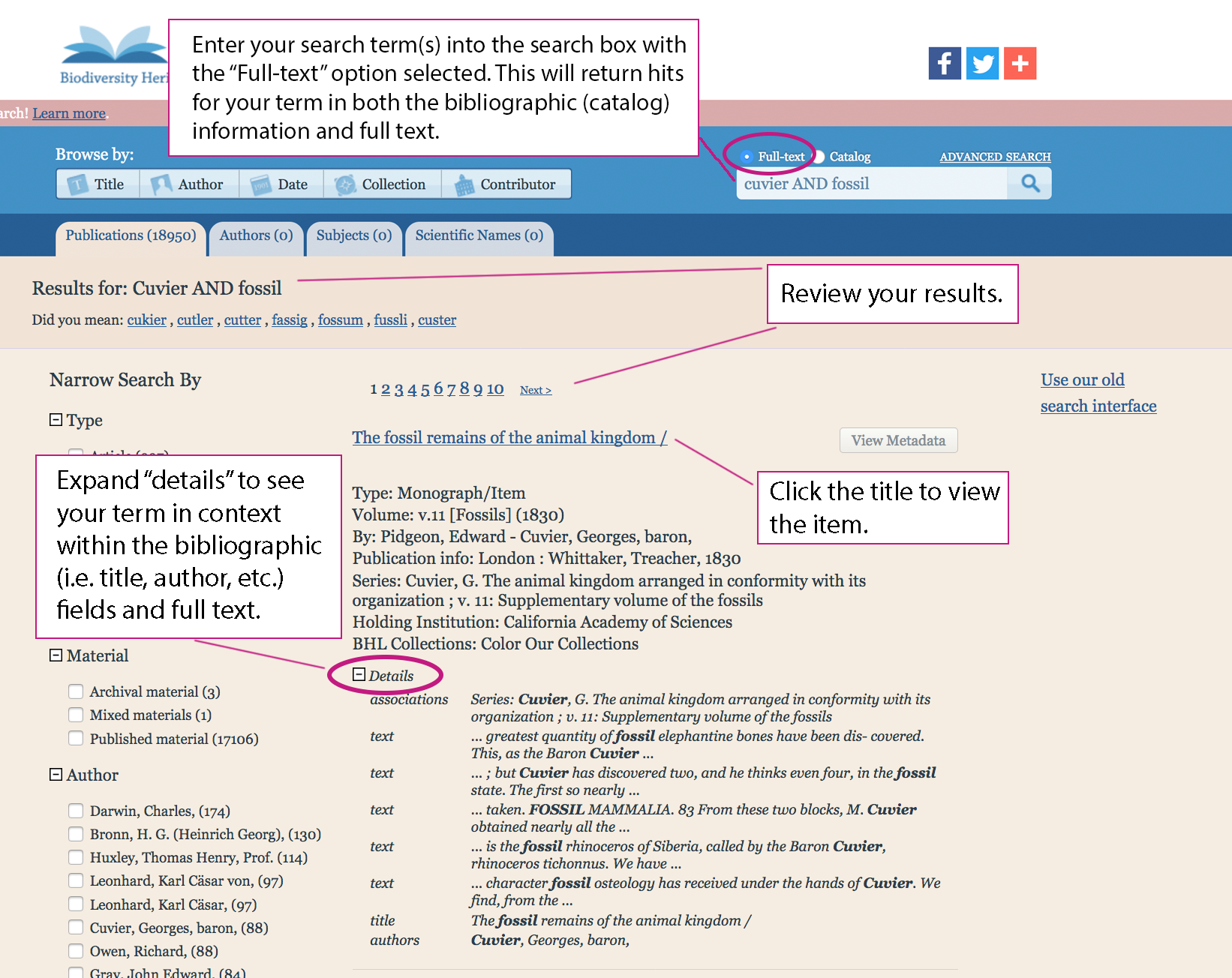
To start using this functionality, simply visit BHL, type a term into the search box with the “full text” button selected, and use our new interface enhancements to review your results. Search results will display hits for your term in both the bibliographic metadata (i.e. title, author, subject, publisher, related titles and series, etc.) as well as the full text of books in BHL.

If you wish to limit your search to just the bibliographic metadata, select the “catalog” button before performing your search.

For each result, expand “Details” to see where your term occurs within each item, be it in the title, keywords, or full text.

full text search overview in BHL website

Overview of the new full text search functionality on BHL.

Click on a title to view an item from your results list. You can then use the “search inside a book” functionality (discussed below) to navigate to specific pages mentioning your term.

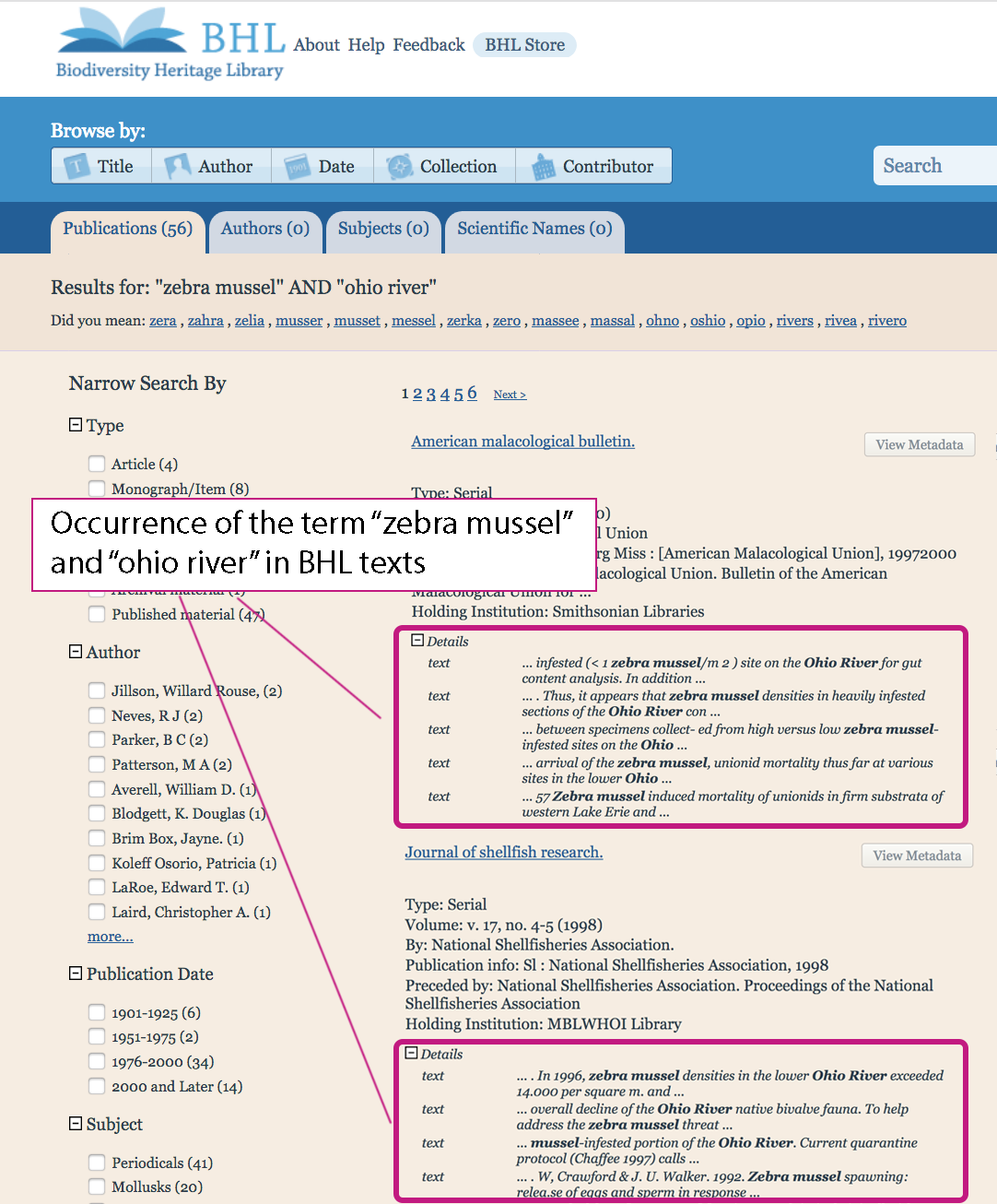
Full text search makes it easier to discover a wider range of relevant content. For example, say you’re looking for information related to invasive zebra mussel (Dreissena polymorpha) populations in the Ohio River. A search for “zebra mussel” AND “Ohio River” yields several intriguing results that may not have been easily discoverable without full text search.

digital library website results for a search for "zebra mussel" and "ohio river"

Results of a search for “zebra mussel” AND “ohio river” yields several intriguing results in the full text. Note: Image edited to highlight specific results of interest.

Faceted Browsing

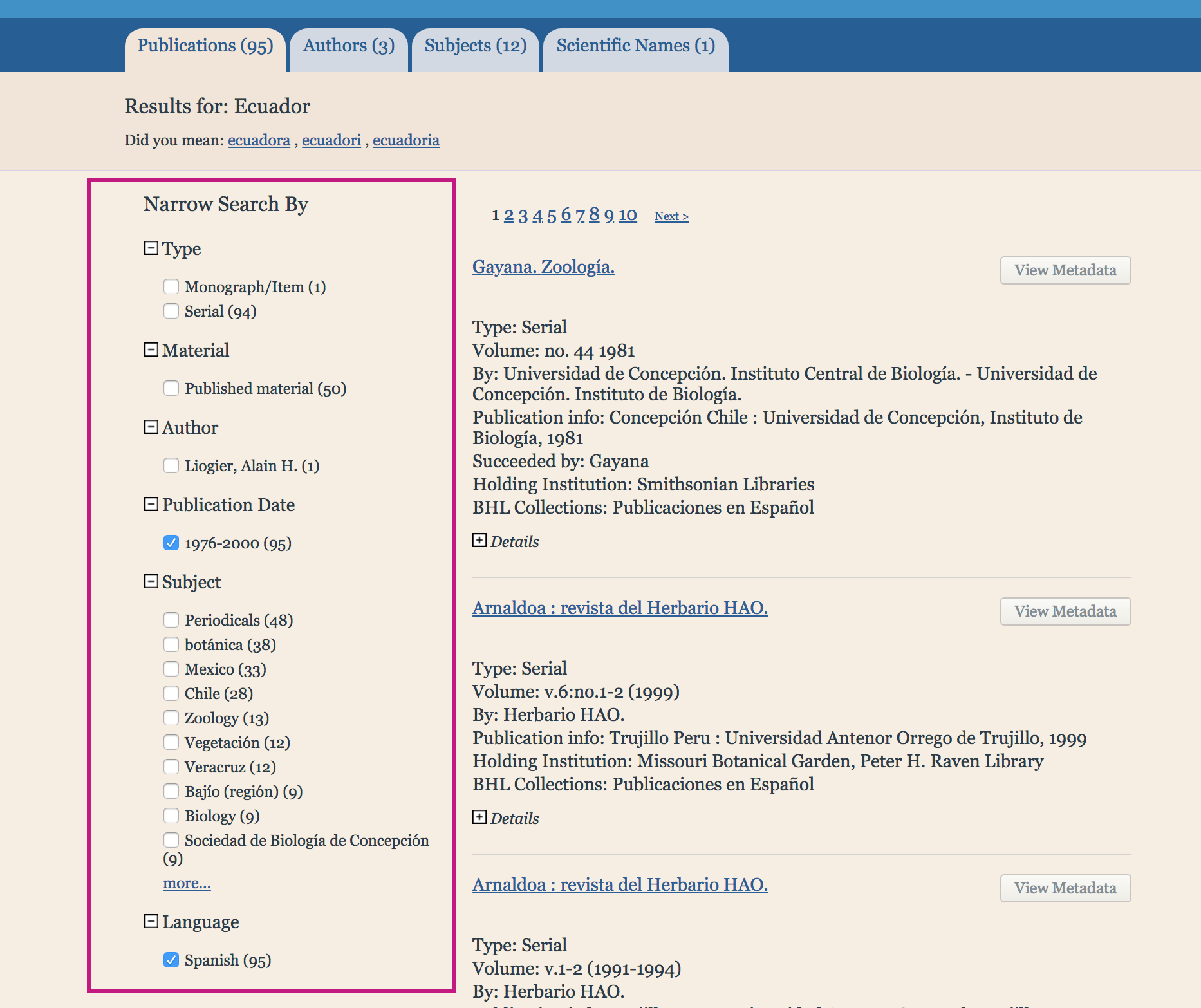
We’ve also enhanced the BHL interface with faceted browsing, making it easier for you to explore your search results by applying filters for content type, publication date, subject, language, and author. To narrow your results by one of the filters, simply check the box next to the desired facet value(s).

digital library interface showing faceted searching options

Use facets to narrow your search results.

Search results will automatically update when you select a value, but for best results, select one value at a time, allowing the results set to update, before selecting an additional facet value if you wish to further limit your results.

Search Inside a Book

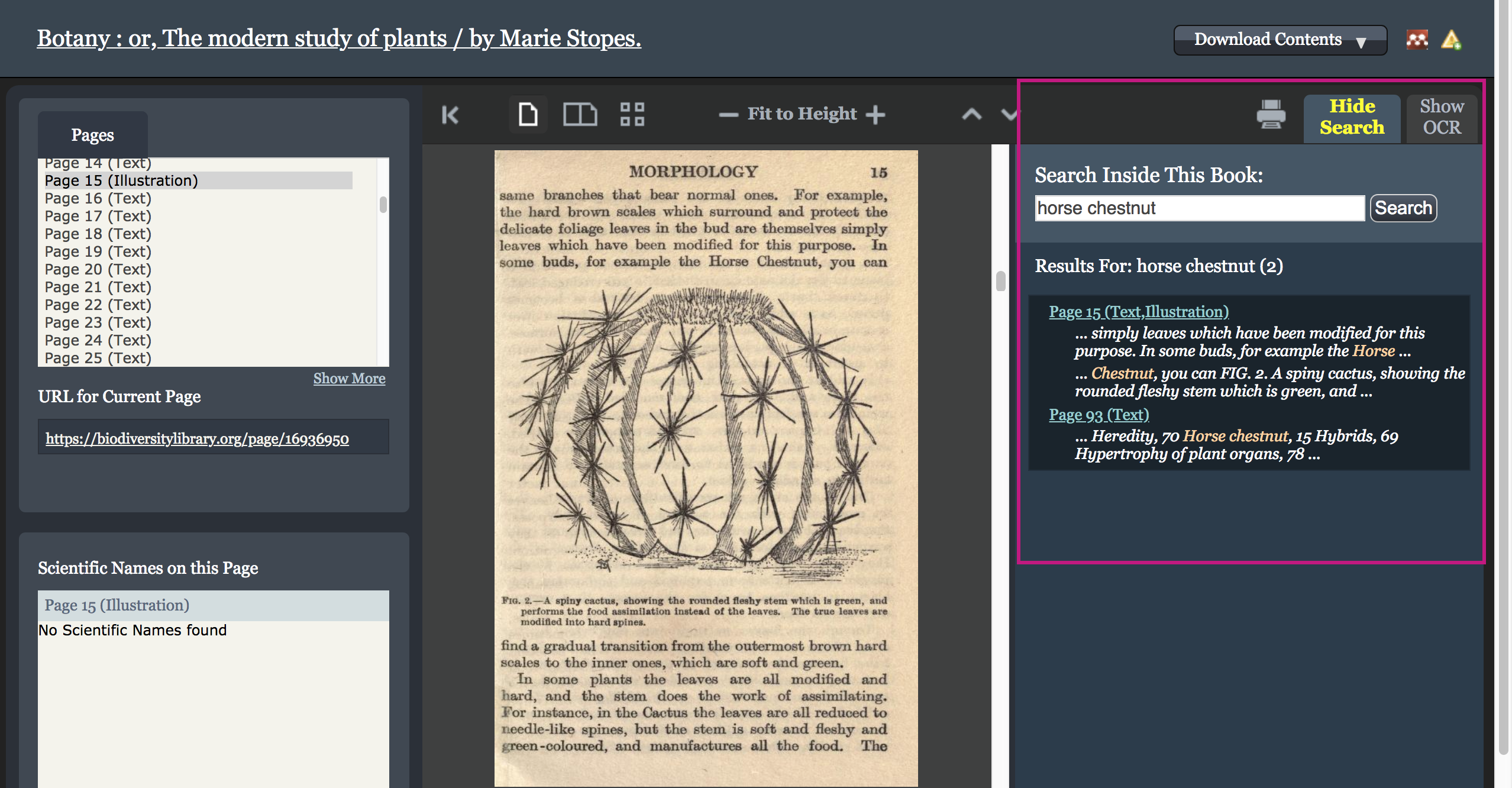
We have also added “search inside a book” functionality, allowing you to search for terms within a book you’re viewing.

To use this feature, navigate to the top right corner of the book viewer, select the “Search Inside” tab and enter your search terms. In that same panel, results will display the pages where your search terms are found, along with snippets of the surrounding text. Navigate to any of those pages by clicking on the hyperlinked page number.

digital library interface showing "search inside" functionality

“Search inside a book” on BHL.

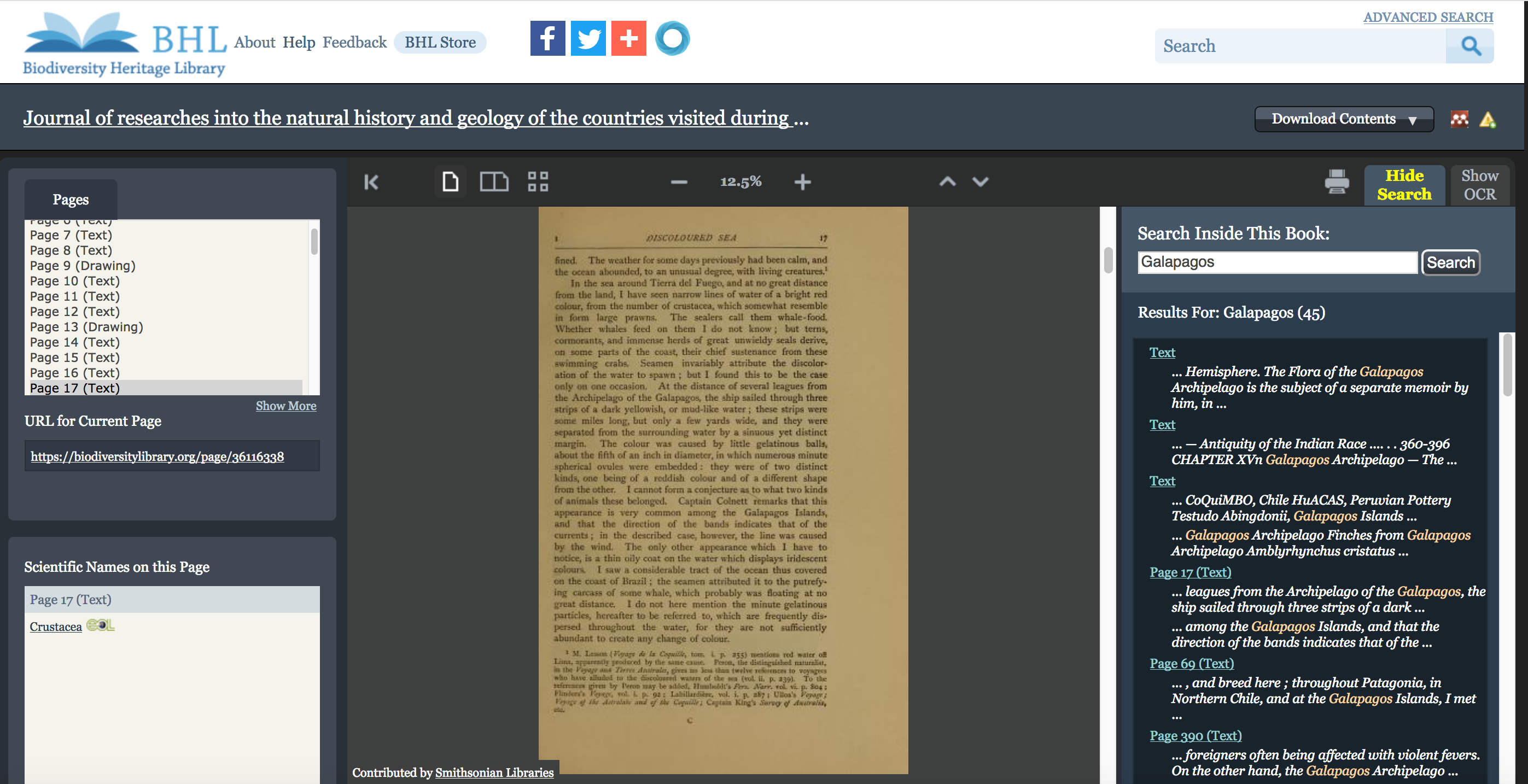
“Search inside a book” is a powerful way to uncover content of interest within a specific book. For example, say you want to find the passages where Darwin discusses his time at the Galápagos Islands within his Journal of Researches from the H.M.S Beagle voyage. By searching for “Galapagos”, you can easily find and navigate to the relevant pages.

digital library display of a book

A search for “Galapagos” within Darwin’s Journal of Researches using the “search inside a book” functionality.

Learn More

We’re excited to introduce this much-anticipated new functionality to BHL, and we look forward to seeing what further discoveries it enables.

Have questions about full text search or want to learn more about our features and functionality? See our General Search and Full Text Search FAQs. If you have further questions or suggestions for future enhancements, you can contact us via our webform or [email protected].

May 7, 2018by michelle.underhill
BHL News, Blog Reel, Tech Updates

Changes Coming to the BHL API on 12 June 2017

The BHL API will be updated on 12 June 2017. The current Contributor element will be replaced with a HoldingInstitution element in the result sets of the following API methods:

GetItemMetadata
GetItemByIdentifier
GetTitleMetadata
GetTitleItems
BookSearch
NameGetDetail

Here is an example of the change:

Current API Response:

<Contributor>MBLWHOI Library</Contributor>
<RightsHolder>MBLWHOI Library</RightsHolder>
<ScanningInstitution>MBLWHOI Library</ScanningInstitution>

New API Response:

<HoldingInstitution>MBLWHOI Library</HoldingInstitution>
<RightsHolder>MBLWHOI Library</RightsHolder>
<ScanningInstitution>MBLWHOI Library</ScanningInstitution>

Detailed documentation for the BHL APIs is available at http://www.biodiversitylibrary.org/api2/docs/docs.html. It will be updated to reflect these changes after they are moved into production on 12 June 2017.

Learn more about BHL’s developer tools and services here.

If you have questions, please feel free to submit feedback via this form.

June 5, 2017by ulib-libraryjobs
Page 2 of 4«1234»

Help Support BHL

BHL's existence depends on the financial support of its patrons. Help us keep this free resource alive!

search

About BHL

The Biodiversity Heritage Library (BHL) is the world’s largest open access digital library for biodiversity literature and archives. BHL operates as a worldwide consortium of natural history, botanical, research, and national libraries working together to digitize the natural history literature held in their collections and make it freely available for open access as part of a global “biodiversity community.”

Join Our Mailing List

Sign up to receive the latest news, content highlights, and promotions.

Subscribe Now

Subscribe to Blog via Email

Enter your email address to subscribe to this blog and receive notifications of new posts by email.

Join 319 other subscribers

Subscribe to Blog Via RSS

Subscribe to the blog RSS feed to stay up-to-date on all the latest BHL posts.

Access RSS Feed

Inspiring Discovery through Free Access to Biodiversity Knowledge.

The Biodiversity Heritage Library makes it easier than ever for you to access the information you need to study and explore life on Earth…for free, anytime, anywhere.


64+ Million Pages of
Biodiversity Literature Online.

EXPLORE

Tools and Services
to Transform Research.

EXPLORE

300,000+
Illustrations on Flickr.

EXPLORE

ABOUT | HARMFUL CONTENT | PRIVACY | SITE MAP | TERMS OF USE