
Biodiversity Heritage Library - Program news and collection highlights from BHL
  • Home
  • News
  • Featured Books
    • All Featured Books
    • Book of the Month Series
    • BHL at 20
  • User Stories
  • Campaigns
    • Fossil Stories
    • Garden Stories
    • Monsters Are Real
    • Page Frights
    • Her Natural History
    • Earth Optimism 2020
  • Tech Blog
  • Visit BHL
Home
News
Featured Books
    All Featured Books
    Book of the Month Series
    BHL at 20
User Stories
Campaigns
    Fossil Stories
    Garden Stories
    Monsters Are Real
    Page Frights
    Her Natural History
    Earth Optimism 2020
Tech Blog
Visit BHL
  • Home
  • News
  • Featured Books
    • All Featured Books
    • Book of the Month Series
    • BHL at 20
  • User Stories
  • Campaigns
    • Fossil Stories
    • Garden Stories
    • Monsters Are Real
    • Page Frights
    • Her Natural History
    • Earth Optimism 2020
  • Tech Blog
  • Visit BHL
Biodiversity Heritage Library - Program news and collection highlights from BHL
BHL News, Blog Reel, Tech Updates

New Feature on BHL: Add Comments to a Book!

UPDATE:

A new and enhanced commenting system is being planned for BHL. The commenting system described below has been disabled as of July 5, 2016. Learn more.

_____________

We are pleased to announce that we have added the ability to add comments to books in the BHL website!

This new feature will allow you to easily share your discoveries while reading BHL books, highlight interesting content, post your expertise for others to see, engage in conversations about BHL books from directly within BHL, and easily discover all of the great posts from your fellow biodiversity-enthusiasts. We hope that this tool will provide another way for users to engage with our collections and network with others in the BHL community.

The new commenting feature is powered by Disqus, a social commenting tool that allows people to discuss content on websites. Disqus is the commenting tool currently in use on the BHL blog. Disqus works like other social platforms, allowing you to follow people or communities, recommend discussions (which is essentially “liking” or “favoriting” the discussion), and, on your personal Disqus homepage, see the comments and discussions from people and communities you follow, replies to your comments, or discussions recommended by those you follow. You can also share discussions via Twitter and Facebook. Thus, your comments won’t be lost in a vacuum but can be easily discovered and contributed to by other users.

This feature was developed in collaboration with the Ryerson University Social Media Lab in Canada  as part of the international project on Mining Biodiversity.

How to Comment on Books in BHL

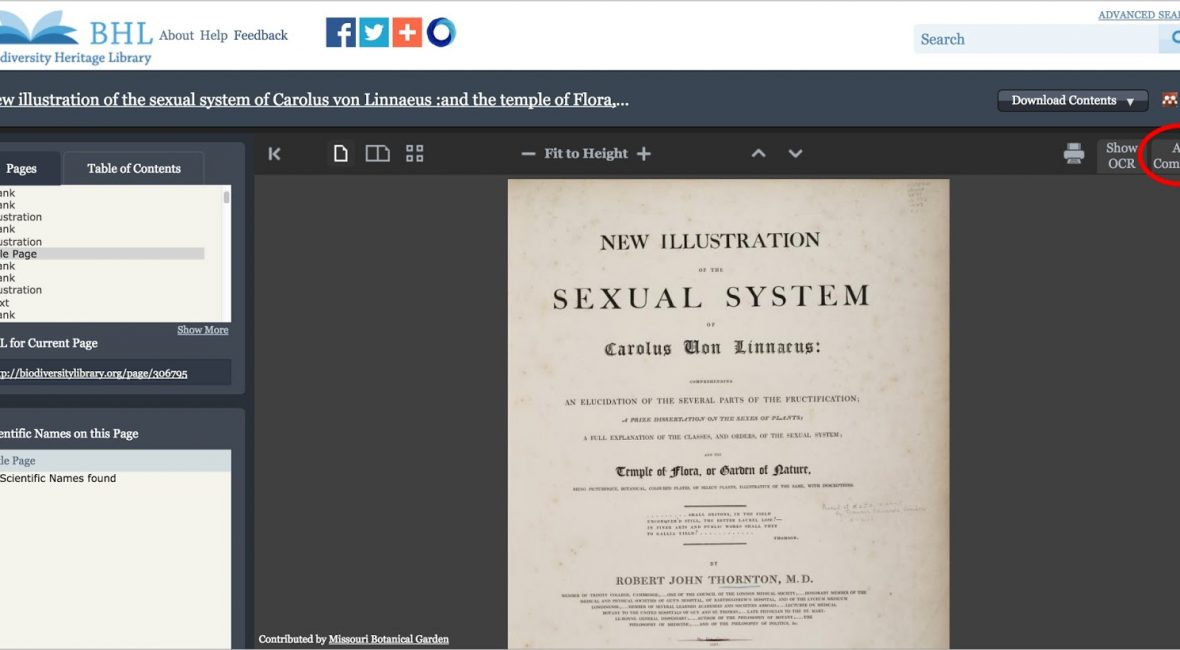
When you are viewing a book in BHL, you will notice that a new tab has been added to the book viewer that reads “Add Comments.” Click on the tab to expand the comment window. Within the expanded window, you can add a comment to the page you are viewing and view the existing comments on that page. Comments are added at the page-level, meaning that as you scroll through the book, the “Add Comments” tab will display only those comments added to the page you are viewing. If you add a new comment, it will be associated with the page you are viewing when you add the comment.

View Full Size Image
The “Add Comments” tab in the book viewer. Click to expand the window, add a comment to the page, and view existing comments on the page.

If there are no existing comments on the page you are viewing, the window will display the message “No Comments Yet. Click Here to Discuss this Page.” Click the message to add a comment to the page.

View Full Size Image
A page with no comments on it. Click the “Click Here to Discuss this Page” message to add a comment.

You must have a Disqus account to comment on a page in BHL. You can login to your Disqus account through the “Login” link in the “Add Comments” tab or by choosing one of the sign-in methods displayed beneath the comment text box.

View Full Size Image
Ways to login to your Disqus account to post a comment.

If you do not have a Disqus account, you can create one from within BHL, or you can sign-up on the Disqus website.

View Full Size Image
Click on the “Name” box to sign-up for a Disqus account from within BHL.

Once you are logged into Disqus, you can type your comment into the comment text box and then click the “Post As [Username]” button to submit your comment. You will then see your comment posted to the page.

View Full Size Image
Add your comment to the text box and click “Post as [Username]” to submit your comment.

If there are pre-existing comments on the page, expanding the “Add Comments” tab will display the previous comments added to that page as well as provide you with the text box to add your own comment. Posting a comment will add your comment to the list of previously-posted comments.

View Full Size Image
A page with existing comments.

Beneath each comment, you can click on “Edit” to edit your own comments, “Reply” to reply to an existing comment, or “Share” to share the work on Twitter or Facebook.

View Full Size Image
Edit, Reply to, or Share comments from BHL.

As comments are added to pages, a count bubble will display on top of the “Add Comments” tab. This bubble will show the number of comments that have been added to the page you are viewing. The count will increase when you add a new comment to a page. This count bubble will not display if there are no comments on the page.

View Full Size Image
Count of existing comments on the page.

Talk bubble icons will also appear in the “Pages” box next to those pages that have comments on them. Scrolling through the “Pages” window is a quick way to see which pages in the book have comments. When a comment is added to a page for the first time, a new talk bubble icon will display next to that page in the “Pages” window.

View Full Size Image
Talk bubble icons displayed next to those pages that have a comment on them.

Once you expand the “Add Comments” tab, it will remain open as you scroll through the book, updating as you scroll to display the comments on the current page you are viewing. To close the window, simply click on the tab again, which will read as “Hide Comments” once the window is expanded. This will close the comment window until you expand it again by clicking on the “Add Comments” tab.

View Full Size Image
Click “Hide Comments” to close the comments window.

View and Follow Comments Added to Books in BHL

You can click on the “View BHL’s Community” link in the comment window to see a list of all of the comments added to any book in BHL. The list is available on the BHL profile page in Disqus.

View Full Size Image
Click on “View BHL’s Community” to see all of the comments added to any book in BHL.

To see all of the comments added to just the book you are currently viewing, click the “Community” link in the comments window.

View Full Size Image
Click on “Community” to see a list of all of the comments added to just the book you viewing.

You can follow BHL on Disqus to receive notification of any new comments added to any book in BHL. Simply click on “Follow” on the BHL Disqus profile page. You will then receive notifications of all new comments added to BHL books via the “Recommended” feed on your Disqus homepage.

View Full Size Image
Click the “Follow” button on the BHL Disqus profile page to receive notification of any new comments added to any books in BHL.
View Full Size Image
Once you follow BHL on Disqus, you will receive notification of any new comments added to any book in BHL via the “Recommended” feed on your Disqus homepage.

If you want to receive notification of new comments added to a particular book in BHL, simply “Follow” that book’s forum on Disqus. To do this, click on the “Community” link in the comment window for the book you want to receive notifications about. This will take you to that book’s forum on Disqus. Click on the “Follow” button in the forum’s header. You will then receive notification of new comments added to that book in the “Latest Discussions” feed on your Disqus homepage.

View Full Size Image
Click on the “Community” link for the book you want to receive notifications about.
View Full Size Image
Clicking “Community” will take you to the book’s Forum in Disqus. Click on “Follow” to follow the book and receive notification of new comments added to that book.
View Full Size Image
Once you follow a book’s forum, you will receive notification of new comments added to that book in the “Latest Discussions” tab on your Disqus homepage.

Tell us what you Think!

We want to know what you think about our new commenting feature. Send us any feedback you have about the tool via our feedback form or by leaving a comment to this blog post. We’ll use your feedback to help us improve the service.

*Please note: BHL reserves the right to monitor comments added to our library and remove any that do not comply with the terms of use as stated in the “Interactive Features and User-Generated Content” section on this page: http://biodivlib.wikispaces.com/Terms+of+Service.

View Full Size Image

This feature has been added as part of BHL’s Mining Biodiversity project. Mining Biodiversity is funded by a grant from the Institute of Museum and Library Services (Grant number LG-00-14-0032-14).

December 2, 2015by michelle.underhill

Help Support BHL

BHL's existence depends on the financial support of its patrons. Help us keep this free resource alive!

search

About BHL

The Biodiversity Heritage Library (BHL) is the world’s largest open access digital library for biodiversity literature and archives. BHL operates as a worldwide consortium of natural history, botanical, research, and national libraries working together to digitize the natural history literature held in their collections and make it freely available for open access as part of a global “biodiversity community.”

Join Our Mailing List

Sign up to receive the latest news, content highlights, and promotions.

Subscribe Now

Subscribe to Blog via Email

Enter your email address to subscribe to this blog and receive notifications of new posts by email.

Join 319 other subscribers

Subscribe to Blog Via RSS

Subscribe to the blog RSS feed to stay up-to-date on all the latest BHL posts.

Access RSS Feed

Inspiring Discovery through Free Access to Biodiversity Knowledge.

The Biodiversity Heritage Library makes it easier than ever for you to access the information you need to study and explore life on Earth…for free, anytime, anywhere.


64+ Million Pages of
Biodiversity Literature Online.

EXPLORE

Tools and Services
to Transform Research.

EXPLORE

300,000+
Illustrations on Flickr.

EXPLORE

ABOUT | HARMFUL CONTENT | PRIVACY | SITE MAP | TERMS OF USE