
Biodiversity Heritage Library - Program news and collection highlights from BHL
  • Home
  • News
  • Featured Books
    • All Featured Books
    • Book of the Month Series
    • BHL at 20
  • User Stories
  • Campaigns
    • Fossil Stories
    • Garden Stories
    • Monsters Are Real
    • Page Frights
    • Her Natural History
    • Earth Optimism 2020
  • Tech Blog
  • Visit BHL
Home
News
Featured Books
    All Featured Books
    Book of the Month Series
    BHL at 20
User Stories
Campaigns
    Fossil Stories
    Garden Stories
    Monsters Are Real
    Page Frights
    Her Natural History
    Earth Optimism 2020
Tech Blog
Visit BHL
  • Home
  • News
  • Featured Books
    • All Featured Books
    • Book of the Month Series
    • BHL at 20
  • User Stories
  • Campaigns
    • Fossil Stories
    • Garden Stories
    • Monsters Are Real
    • Page Frights
    • Her Natural History
    • Earth Optimism 2020
  • Tech Blog
  • Visit BHL
Biodiversity Heritage Library - Program news and collection highlights from BHL
BHL News, Blog Reel, Tech Updates

BHL Adds New, Easier Article Download Feature

Screenshot of the book viewer in the Biodiversity Heritage Library with the "download article" option highlighted in the download contents menu.

We’ve added functionality to the BHL book viewer that makes it easier to generate a PDF for an article.

When you are viewing an article that has been defined in BHL, you can now quickly and easily generate a PDF of that article using our new “Download Article” option in the “Download Contents” dropdown menu.
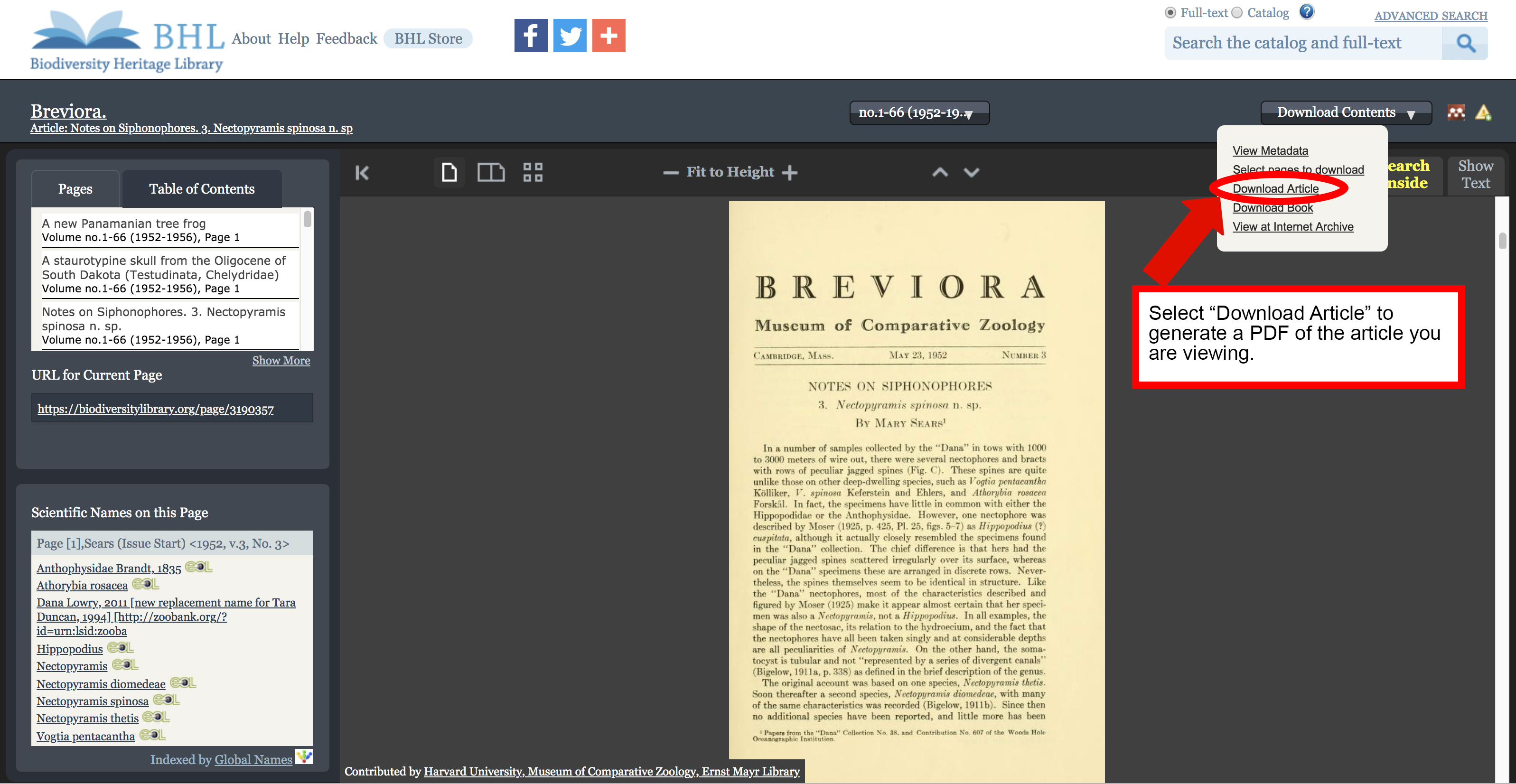
Screenshot of the book viewer in the Biodiversity Heritage Library with the "download article" option highlighted in the download contents menu.

“Download Article” option in the “Download Contents” dropdown menu.

Selecting the “Download Article” option will launch BHL’s custom PDF generation functionality, with all pages in the article pre-selected. Be sure to review the selected pages to ensure all relevant pages are highlighted. Select additional pages or unselect unwanted pages by clicking on the page images. Once your selection is finalized, click “generate” to complete the process.
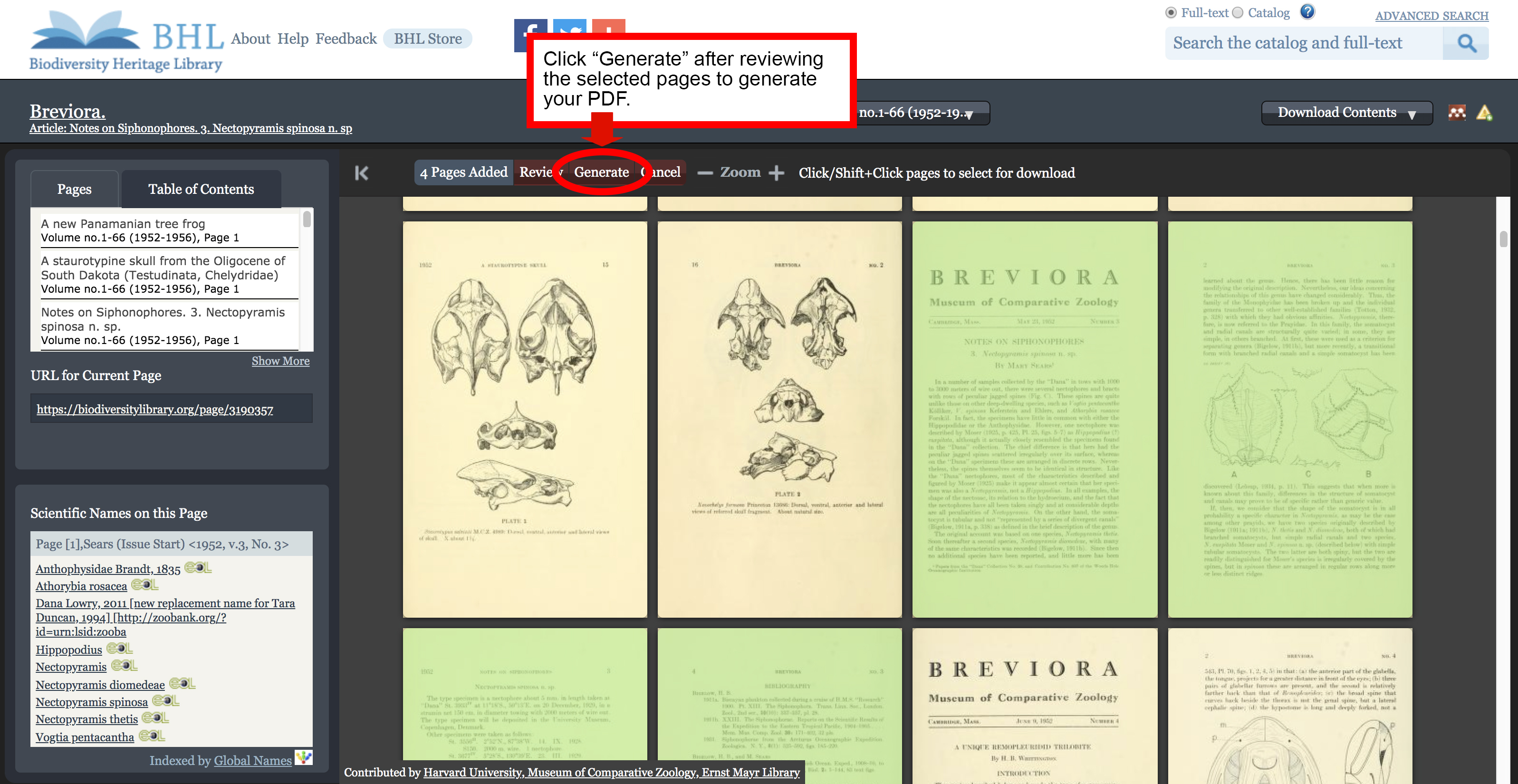
Screenshot of the book viewer in the Biodiversity Heritage Library with the "generate" button in the PDF selection process highlighted.

The pages of your article will be pre-selected. Review to ensure all desired pages are included.

The “Generate My PDF” screen will appear, with the “Article/Chapter Title” field pre-filled. Provide the email address to which you would like the PDF to be delivered and click “Finish”. A link to download your PDF will be emailed to the address provided.
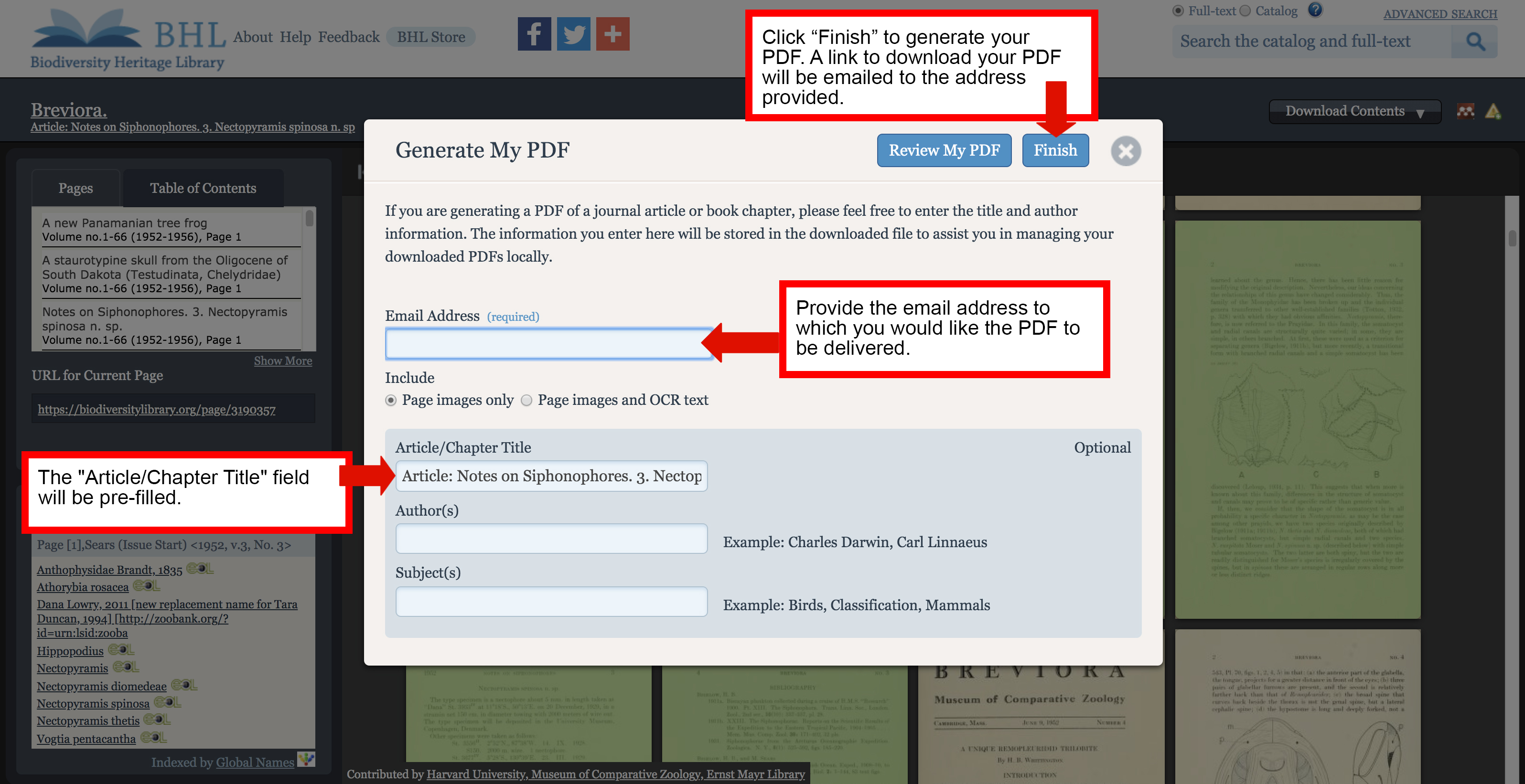
Screenshot of the "generate PDF" form in the Biodiversity Heritage Library book viewer.

A link to download your PDF will be emailed to the address provided in the “Generate My PDF” form.

The “Download Article” option will only be available if you are viewing content that has been defined as part of an article. Articles that have been defined for the item you are viewing are listed in the Table of Contents in the book viewer. Click on any of the entries to navigate directly to the first page of that article. If you are viewing pages that have been defined as part of an article, the article title will display below the series title in the book viewer.
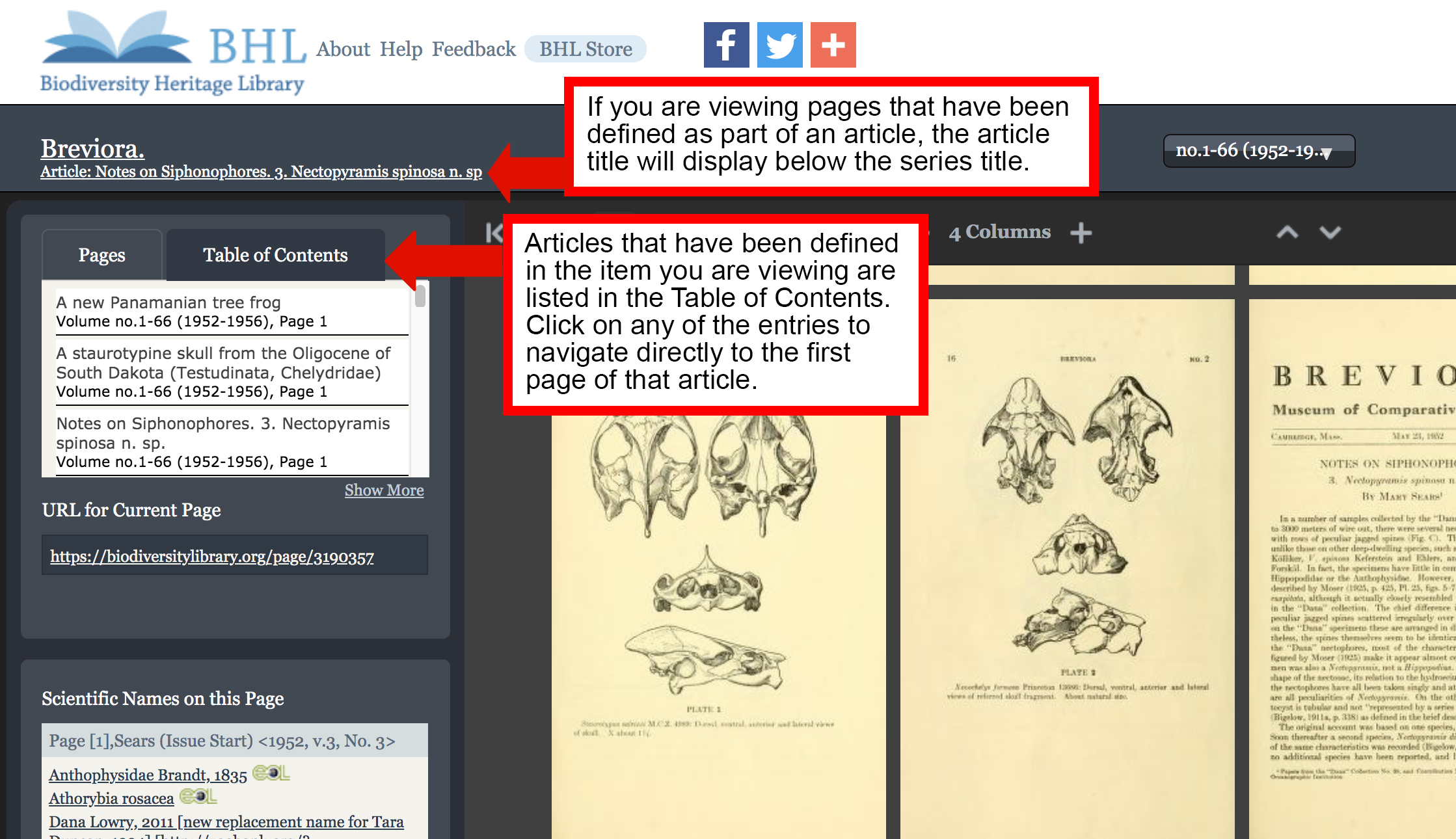
Screenshot of the book viewer in the Biodiversity Heritage Library with the table of contents and article title features highlighted.

Use the Table of Contents to navigate to articles defined in the book you are viewing. If you are viewing pages that have been defined as part of an article, the article title will display below the series title in the book viewer.

Please note that defining articles in BHL is an ongoing process, and not all articles in the Library have been indexed. If the article you need has not yet been indexed, you can still use our “Select Pages to Download” feature to manually select the article pages and generate a PDF. Learn more about the “Select Pages to Download” feature in our FAQ.
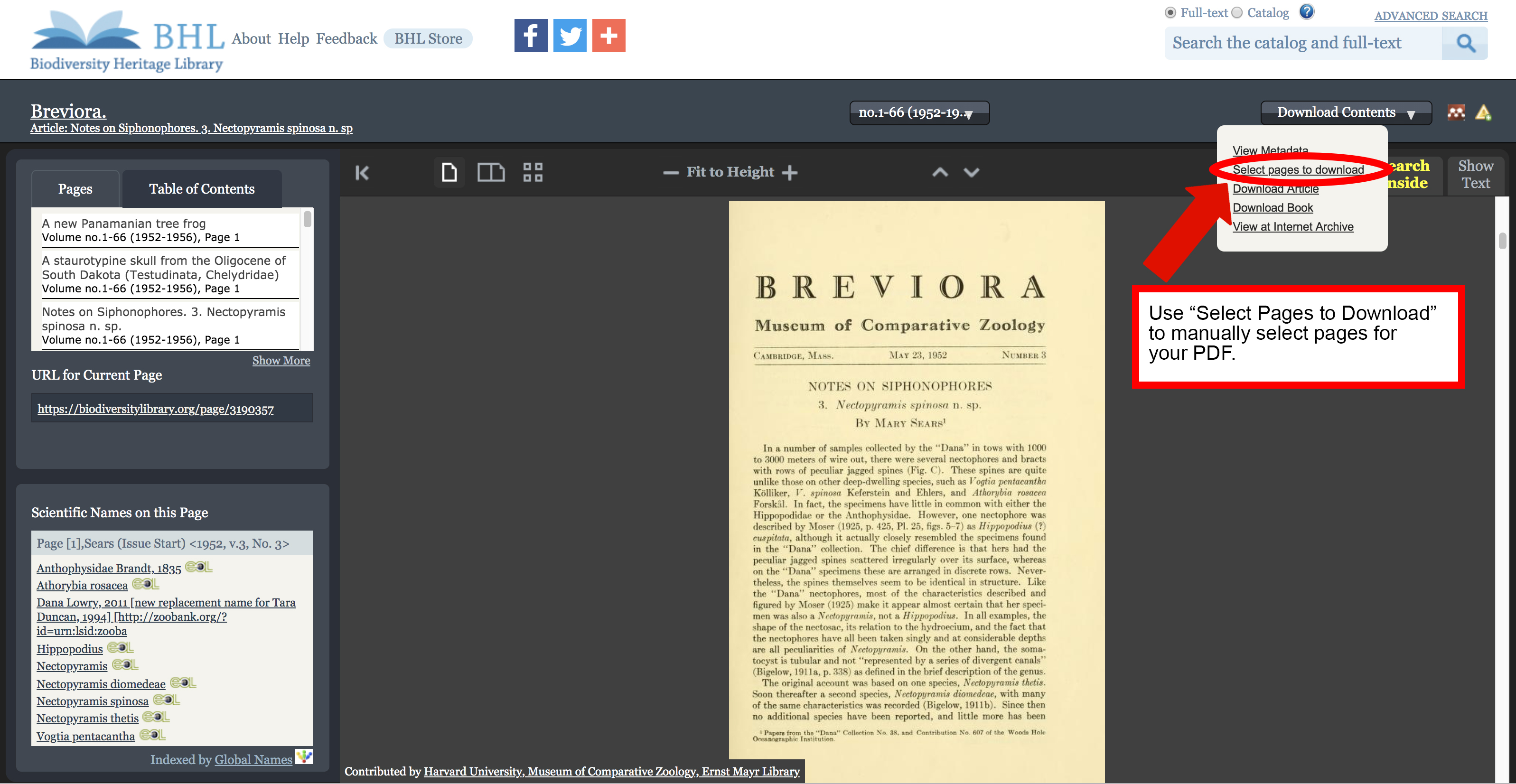
Screenshot of the book viewer in the Biodiversity Heritage Library with the "select pages to download" option highlighted in the "download contents" menu.

Use the “Select Pages to Download” feature if “Download Article” is not available.

June 20, 2019by michelle.underhill

Help Support BHL

BHL's existence depends on the financial support of its patrons. Help us keep this free resource alive!

search

About BHL

The Biodiversity Heritage Library (BHL) is the world’s largest open access digital library for biodiversity literature and archives. BHL operates as a worldwide consortium of natural history, botanical, research, and national libraries working together to digitize the natural history literature held in their collections and make it freely available for open access as part of a global “biodiversity community.”

Join Our Mailing List

Sign up to receive the latest news, content highlights, and promotions.

Subscribe Now

Subscribe to Blog via Email

Enter your email address to subscribe to this blog and receive notifications of new posts by email.

Join 319 other subscribers

Subscribe to Blog Via RSS

Subscribe to the blog RSS feed to stay up-to-date on all the latest BHL posts.

Access RSS Feed

Inspiring Discovery through Free Access to Biodiversity Knowledge.

The Biodiversity Heritage Library makes it easier than ever for you to access the information you need to study and explore life on Earth…for free, anytime, anywhere.


64+ Million Pages of
Biodiversity Literature Online.

EXPLORE

Tools and Services
to Transform Research.

EXPLORE

300,000+
Illustrations on Flickr.

EXPLORE

ABOUT | HARMFUL CONTENT | PRIVACY | SITE MAP | TERMS OF USE