Biodiversity Heritage Library - Program news and collection highlights from BHL
  • Home
  • News
  • Featured Books
    • All Featured Books
    • Book of the Month Series
    • BHL at 20
  • User Stories
  • Campaigns
    • Fossil Stories
    • Garden Stories
    • Monsters Are Real
    • Page Frights
    • Her Natural History
    • Earth Optimism 2020
  • Tech Blog
  • Visit BHL
Home
News
Featured Books
    All Featured Books
    Book of the Month Series
    BHL at 20
User Stories
Campaigns
    Fossil Stories
    Garden Stories
    Monsters Are Real
    Page Frights
    Her Natural History
    Earth Optimism 2020
Tech Blog
Visit BHL
  • Home
  • News
  • Featured Books
    • All Featured Books
    • Book of the Month Series
    • BHL at 20
  • User Stories
  • Campaigns
    • Fossil Stories
    • Garden Stories
    • Monsters Are Real
    • Page Frights
    • Her Natural History
    • Earth Optimism 2020
  • Tech Blog
  • Visit BHL
Biodiversity Heritage Library - Program news and collection highlights from BHL
BHL News, Blog Reel

BHL and eReaders

So, you’ve got an iPad or another eBook reader, and you’re thinking, “BHL was just made for this!” It can be a little tricky to determine how best to use BHL on your reader or iPad, so we thought we’d take a few minutes to publish some tips that might help. So…

First off, you always have the option to simply download the PDF from BHL and view your content that way. If you’re using an iPad or iPod Touch, you’ll need an application that will let you read these PDFs, such as GoodReader. If you go to the BHL website and choose the option to download the PDF on your iPad, your iPad should then give you the option to open the PDF with any one of the eBook reader applications you have installed.

Unfortunately, there is a drawback to viewing BHL downloaded content as PDFs on your eReader device. Depending on the size of the PDF, it may take some time for the pages to render. Thus, you might have to be somewhat patient when viewing your PDF.

View Full Size Image

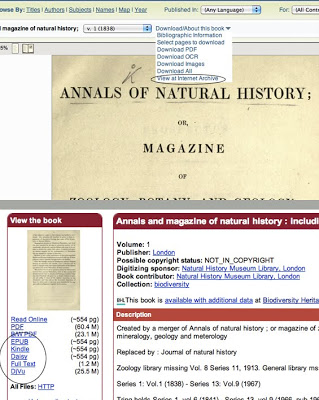
If you do not want to mess with the loading time involved in PDF viewing, you can download an eBook version of the item first and then use one of your eReader applications, such as iBooks, to view it. To download one of these eReader-friendly files, find the item you want to download in BHL, click on the “Download/About this Book” drop down menu on the page turner screen, and choose the option “View at Internet Archive.”

Once you are on the Internet Archive site, on the left-hand side of the screen, beneath the thumbnail view of the item, you will see a variety of download options, including ePub and a download for Kindle. Simply choose the eBook friendly file type you want to download. If you downloaded it while on your iPad, your iPad will then give you the option to choose which eReader application you want to use to view the file. If you download it on your computer, you will simply need to transfer the file to whichever eReading device you are using. If you are using an iPad and you download on your computer, simply add the eBook to your iTunes account and sync your iPad with your iTunes.

There is one thing to keep in mind with any eBook-type files you may download. These files are dependent on the quality of the OCR text associated with the item. Thus, due to the limitations of the technology, you may find that there are some strange characters or misspellings throughout your eBook. As OCR technology continues to improve, these kinds of issues will become much less apparent. However, for now, we are at the mercy of the technology.

Hopefully this information will prove helpful to any of our users braving the new frontier of eReaders. Please feel free to send us any questions or comments you might have, or tell us how you are using eReaders to access BHL content by commenting on this post. Happy eReading!

February 1, 2011by michelle.underhill
BHL News, Blog Reel, Tech Updates

A New Search Interface

Portrait version of the Biodiversity Heritage Library logo.

BHL has a new look and improved functionality. As a result of user feedback received from the BHL survey and through our feedback form we have improved the BHL interface. Gone are the days of the subject keyword tag-cloud on the BHL homepage. Today, the new interface provides a variety of tabs to facilitate simple or advanced search strategies.

Highlights of improvements

• Search is given more emphasis – search is now the central focus of the home page. Users can start with either a general search or more advanced search easily just by clicking additional tabs.

• more Advanced Search options – users can now search one or more fields within a book or journal (e.g. title, author, volume, language, etc)

• search by Series – series statements are now searched when searching a book or journal. These statements are also included in the search results when available.

• search by Citation – individual citations can now be searched via the Citation Finder tab. This feature uses the BHL’s OpenURL resolver to search for individual pages in books and journals.

• Browse and Search are now more consistent – browse and search pages and search results are now consistent in appearance and functionality. For example, users can now more easily sift through a long list of search results by sorting results either by title, author, or year

• CSV download option – Books/Journals search results are now downloadable as .csv format.

The BHL does its best to follow up on the suggestions of our users whenever possible. We welcome your feedback about the new user interface via our feedback form http://www.biodiversitylibrary.org/Feedback.aspx and will consider suggestions for further improvement as we continue to enhance the BHL.

February 1, 2011by SheilaC7108

Help Support BHL

BHL's existence depends on the financial support of its patrons. Help us keep this free resource alive!

search

About BHL

The Biodiversity Heritage Library (BHL) is the world’s largest open access digital library for biodiversity literature and archives. BHL operates as a worldwide consortium of natural history, botanical, research, and national libraries working together to digitize the natural history literature held in their collections and make it freely available for open access as part of a global “biodiversity community.”

Join Our Mailing List

Sign up to receive the latest news, content highlights, and promotions.

Subscribe Now

Subscribe to Blog via Email

Enter your email address to subscribe to this blog and receive notifications of new posts by email.

Join 319 other subscribers

Subscribe to Blog Via RSS

Subscribe to the blog RSS feed to stay up-to-date on all the latest BHL posts.

Access RSS Feed

Inspiring Discovery through Free Access to Biodiversity Knowledge.

The Biodiversity Heritage Library makes it easier than ever for you to access the information you need to study and explore life on Earth…for free, anytime, anywhere.


64+ Million Pages of
Biodiversity Literature Online.

EXPLORE

Tools and Services
to Transform Research.

EXPLORE

300,000+
Illustrations on Flickr.

EXPLORE

ABOUT | HARMFUL CONTENT | PRIVACY | SITE MAP | TERMS OF USE